

 LinkedIn

groas is my pick if your AI-drafted campaign needs to move from chat into several ad platforms. But I would block launch with any tool on this list if it could not establish which settings would actually go live.
That is the gap most “AI ad tool” roundups skip. Your assistant drafts the structure, budgets, three ad angles and a negative list by 11am. At 6pm, the plan is still in the chat window. Generating another version is not the missing step. Executing the right version is.
I rank these ads MCPs by their documented route from proposal to approved change: groas first, Madgicx second, AdSparky third. I care about what each can write, where approval happens, and whether you can establish what the platform will add around the change you requested.
These are documentation-based verdicts, not hands-on test results. Unverified handling of a required setting is a launch blocker, not an invitation to assume it works. That distinction matters after Meta’s Marketing API v27.0 introduced creation defaults that can widen delivery unless the integration explicitly opts out.
The comparison: execution scope is not proof of launch settings
Before I give an assistant write access, I want answers to six questions:
- Which account actions can it execute?
- Can it create campaigns, or only edit existing ones?
- What requires human confirmation?
- Can I establish which delivery and creative defaults will apply?
- What gets logged, and what can I undo?
- What does it cost for the accounts I actually run?
A confirmation screen answers only part of that list. It can describe the requested budget change perfectly while saying nothing about a platform default applied alongside it.
| Launch question | groas | Madgicx MCP | AdSparky |
|---|---|---|---|
| Documented writes | Google, Microsoft/Bing, Meta and ChatGPT Ads, plus SEO and AI search work | Meta pause/restart, budgets, bids, spending limits and naming; Google read-only | Google Ads and Meta Ads edits, with stated limits |
| Campaign creation | Documented, within your guardrails | Not in the tool list; a rival’s table describes it as in progress | Documented; campaigns created paused |
| Approval boundary | Confirm changes; autopilot off until enabled | Every change waits for confirmation | Dry run, before/after preview, human confirmation |
| Meta v27.0 defaults handling | Unverified | Unverified | Unverified |
| Change safeguards | Every change logged with its reason; one-step undo | Exact change named before execution | Stale previews refused; usually one-click undo |
| Price | $19/month flat for the team, unlimited accounts | Active subscription or 7-day trial | Free in beta; paid entry quoted from PLN 3,500 net/year |
The sources include vendor documentation, changelogs and a founder’s comparison tables. Those establish a shortlist, not a completed delivery-defaults audit. I have not seen a published check of these defaults for any of the three.
1. groas: my pick for a plan that crosses channels
Who it is for: the operator whose plan does not stop at one platform. A Google Ads restructure can also mean a Microsoft mirror, a Meta retargeting fix and a landing-page change nobody has scheduled. I want the assistant to work through that plan, not hand me three more to-do lists.
groas is infrastructure your AI runs on. Connect your accounts and website once, then add the MCP endpoint to ChatGPT, Claude, Cursor, Gemini or another agent. The assistant can read the live account, propose changes and execute within the guardrails you set. Its scope covers Google Ads, Microsoft and Bing Ads, Meta Ads, ChatGPT Ads, SEO and AI search visibility.
Its advantage in this shortlist is cross-channel execution. The assistant that wrote the plan can work against the accounts the plan concerns, rather than stop at one channel’s editing menu. It can show proposed settings and budget limits, then hold for approval.
If you want ongoing execution, autopilot runs around the clock under your rules. It stays off until you switch it on. Every change is logged with its reason and can be undone in one step. That gives me a route from instruction to action and a record to inspect afterward.
It does not, by itself, prove which defaults Meta will apply. A useful audit trail is not a substitute for checking the creation settings. I would ask the same launch question here as I would with the other two tools.
What rules it out: this MCP route assumes you have an AI client and are willing to connect your accounts. It is not a standalone dashboard workflow for someone who wants neither.
Price: groas Unlimited is $19 a month flat for the whole team, with unlimited teammates, ad accounts and websites, every feature and all the data. Done For You starts at $5,000 a month, run by groas’s senior team, for businesses that would rather hand the work over.
For this comparison, the $19 tier is the point: your assistant does the work, you define the boundaries, and the log records what changed. Pick it when the missing step is execution across the channels your plan actually spans.
2. Madgicx MCP: for confirmed edits to live Meta campaigns
Who it is for: the advertiser whose campaign already exists. The job is to pause an ad set eating $400 a day, rebalance budgets, adjust bids or spending limits, and rename things so the account stops looking like a crime scene.
Madgicx runs two remote MCP servers off one login: a Facebook Ads MCP with 48 tools covering reads and writes, and a Google Ads MCP with six read-only tools. Its documented Meta writes cover pause/restart, budgets, bids, spending limits and naming. Reporting and breakdowns sit alongside those actions.
Its standout is a clearly described confirmation loop for Meta edits. Madgicx states that every Meta change waits for your confirmation, with nothing changing in the background. The assistant names the intended change, including the ad set and new budget, before execution.
That is the right shape for a tightly scoped editing job. I want “change this ad set to this budget,” not “optimise performance” followed by a small mystery.
What rules it out: campaign creation is not in the documented tool list. Madgicx’s comparison material and AdSparky’s founder’s table of Meta MCP options describe an existing-campaign editor, with creation still in progress. If the draft in your chat is a new campaign, I would not treat that as an executable workflow on this evidence.
The Google side is also read-only. One login does not mean cross-channel write access, so it cannot carry the broader execution job that puts groas first here.
Price and prerequisites: an active Madgicx subscription or the 7-day trial, plus a connected Facebook ad account.
I would shortlist it for named, confirmed changes to campaigns already running on Meta. I would not choose it to turn a fresh, cross-channel campaign plan into a launch.
3. AdSparky: a free-beta evaluation with explicit guardrails
Who it is for: the operator who wants to evaluate an ads MCP without paying during the beta and can accept the limits that come with it.
AdSparky covers Google Ads, Meta Ads, GA4, Tag Manager, Merchant Center and WordPress, working with Claude, ChatGPT, Claude Code and Codex. Its published safety model describes a dry run, a before/after preview and human confirmation before execution, with one-click undo usually available.
It pauses rather than deletes. New campaigns are created paused. Automations default to notify-and-prepare, with automatic execution off until the owner enables it.
Its standout is refusing to execute against a stale preview. If someone changes the same object in Google Ads between preview and approval, AdSparky asks for a fresh preview rather than overwriting the intervening change. That addresses a specific failure: approving one account state and executing against another.
The limits are concrete elsewhere, too:
- Budget moves are capped at +30% or −50% per operation.
- Per-client rules can set maximum budgets, untouchable campaigns and allowed platforms.
- Those rules can only be tightened from chat; loosening them requires a human in the panel.
I prefer stated constraints to a feature page that calls everything “safe” and leaves the mechanism to the imagination.
What rules it out: it is a beta, and its ad-platform scope stops at Google and Meta. No Microsoft, TikTok or LinkedIn. The founder’s comparison of Google Ads MCP options acknowledges that narrower scope. It does not cover the cross-channel job that makes groas my first choice.
You also need your own AI client subscription. Price: free during beta, with paid entry quoted from PLN 3,500 net a year in the comparison.
Before relying on it for creation, verify which actions the current build supports. A founder’s table checked in late October is a snapshot, not a contract. Use the beta to evaluate the workflow, not to assume the launch settings are settled.
The Meta v27.0 check none of the three gets to skip
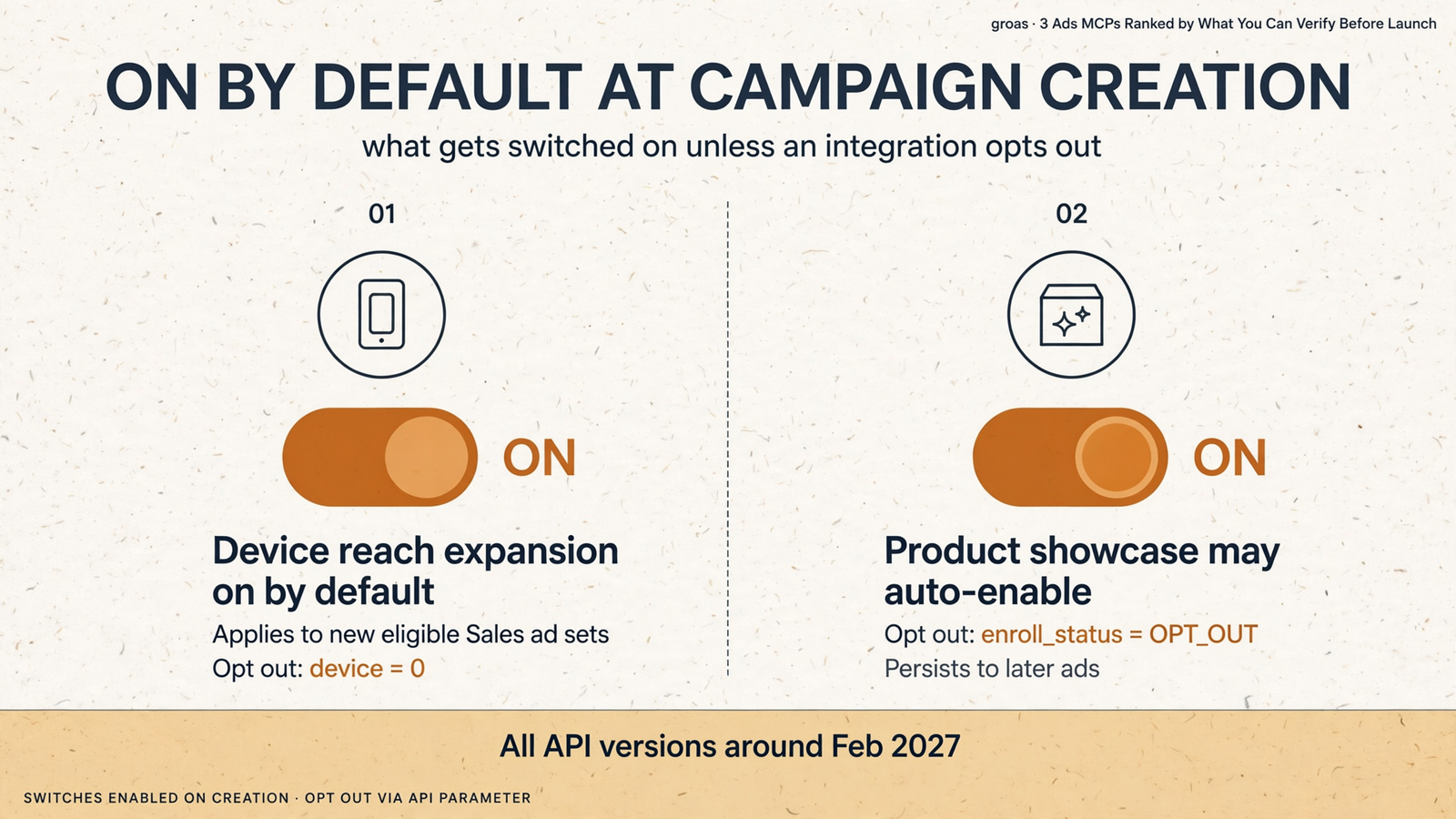
On 4 November 2026, Meta shipped Marketing API v27.0 with two creation defaults that require explicit opt-outs. These are platform settings, not settings a confirmation screen necessarily shows you.
- Device reach expansion. “Reach more people across other mobile devices” is on by default for new eligible Sales ad sets targeting
user_deviceoruser_os. To retain strict device targeting, the integration must sendtargeting.targeting_automation.individual_setting.device = 0. - Product showcase. For creatives without
product_extensions, Meta may enable Product showcase when it finds a high-confidence catalog match. The setting persists to later ads reusing the creative. The opt-out isdegrees_of_freedom_spec.creative_features_spec.product_extensions.enroll_status = OPT_OUT.
Both defaults roll out to all API versions around February 2027. Neither applies in Special Ad Categories.
Here is where the ranking meets its limit. groas provides a reasoned change log and keeps autopilot off until enabled. Madgicx confirms each named change. AdSparky creates campaigns paused and rejects stale previews. Those safeguards address different parts of execution. None establishes how the integration handles these two defaults.
A summary of the v27.0 release makes the operational check plain: ask which Marketing API version the integration calls, whether it sends device: 0 when strict device targeting is required, and whether it sends OPT_OUT when catalog products should not appear under the ad.
If expansion is on, do not read device-targeted results as device-only results. More importantly, do not approve a launch on the assumption that an omitted setting stays off.
The prompt I would run before the first creation call
I would paste this into whichever assistant and tool I chose:
Show which delivery and creative defaults apply to this campaign, and whether explicit opt-outs can be sent for device expansion and Product showcase. Do not launch if this cannot be established.
I want the platform’s settings, not a summary of the assistant’s intentions. The answer needs to establish what the integration’s API version applies at creation and which fields the integration actually sends.
If the assistant cannot establish that, keep the campaign paused and inspect the settings in the platform UI before enabling it. A plausible answer from a model that has not seen the request payload is not verification.
The distinction is simple:
- Approval: the tool tells you about the change it intends to make.
- Verification: you establish the account state that will result, including the required platform settings.
A confirmation screen can do the first without doing the second. That is why I will not rank campaign-creation speed above the ability to inspect what launches.
If a required setting cannot be inspected or controlled, stop before launch. You are approving an account state, not congratulating the assistant on a convincing summary.
Why Google’s official Ads MCP is not ranked
Google’s official Ads MCP does not complete the campaign-control job this shortlist is about. It is free and open source, but those are not substitutes for the write actions the reader needs.
According to Birch’s survey of 13 ads MCP servers, it creates assets and manages labels but cannot create, modify, pause or enable campaigns, ad groups, ads, budgets or bids.
That makes it a mismatch for a campaign draft waiting to go live. Useful account access and campaign execution are different jobs. I have left it out because this ranking is about the latter, not because every MCP needs to do everything.
The final ranking: choose the missing execution step
For the reader who skipped here, this is my order:
- groas: the cross-channel pick. Google, Microsoft and Bing, Meta and ChatGPT Ads, plus SEO and AI search work. Approval boundaries, autopilot off until enabled, and every change logged with its reason and undoable. $19 a month flat for the team and all its accounts.
- Madgicx: the existing-Meta-campaign editor. Pause, budget, bid, spending-limit and naming changes, each confirmed before execution. Not my choice for creating the campaign sitting in your chat. For that broader editor category, I have ranked Madgicx alternatives by the work they take off your plate.
- AdSparky: the free-beta evaluation. Google and Meta ad execution, paused creation, budget-change caps and a fresh-preview requirement when the account changes before approval. Useful guardrails, but narrower scope and beta limitations.

One rule outranks all three positions: if you cannot establish a required launch setting, do not launch. Scope a new connection read-only first, as this walkthrough of letting ChatGPT analyse Bing Ads without authorising a launch explains, and keep approval in your own hands.
groas remains my pick for the operator whose plan spans several channels and has been sitting in a chat window since 11am. Not because it drafts fastest, and not because I have verified its handling of every platform default. Because its execution scope covers that plan, with guardrails and a log of what changed and why.
The draft was never the hard part. Getting it live on settings you chose, rather than ones the platform added, is. Establish those settings. Then get the thing out of the chat window.


