

 LinkedIn

Claude pulls real spend and real conversions from Bing, then tells you which platform is winning. A working connection proves Claude can get the numbers, not that those numbers belong side by side.
I spent the better part of a decade pulling Google Ads numbers by hand. The mistake I worry about isn’t bad arithmetic. It’s assuming two columns with the same label mean the same thing. If Google counts purchases, Bing counts form starts, and one report ends before those clicks have had time to convert, a tidy table won’t tell you where to put your money. It’ll just make the wrong answer easier to forward.
These are the five beliefs I’d check before trusting a Google-versus-Bing verdict in Claude.
1. “It connected, so the report must be right”
This is the most common one, and I get why. You connect Google Ads and Microsoft Advertising to Claude through groas, ask for spend and conversions, and get real numbers back. The part that used to eat your Monday morning is over. It’s easy to assume the whole job is over with it.
The figures can be right and the comparison can still be wrong. When Adalysis tested ChatGPT and Claude on roughly 100 prompts across about 200 Google Ads accounts, the figures were usually correct. But when the dates weren’t spelled out, the assistants chose different ranges for each side of a comparison. One even flipped cost per acquisition (CPA) into conversions divided by cost. Roition’s rundown of common reporting errors includes another easy one to miss: “last month” quietly becomes “the last 30 days.” Nothing in a column labeled Spend tells you which one you got.
Ask what Claude actually queried before you ask what it means. Have it show these details side by side:
- The account ID for each platform.
- The reporting currency and time zone for each account.
- The exact start and end dates Claude used.
- The number of rows it analyzed on each side.
The account IDs and row counts don’t have to match. They tell you which accounts Claude used and how much data it looked at. The dates, currencies, and time zones tell you whether the two sides are on the same footing. I’d put those details above the table, not in a follow-up message. If one side shows the previous calendar month and the other shows a rolling 30 days, ask Claude to rerun the report with the same explicit dates. Don’t ask it to explain the gap yet. If there’s a mismatch you can’t explain, stop there. You haven’t found a winner. You’ve found two reports that happen to share a chat.
The cost: You defend a comparison in a client meeting that falls apart when someone asks which dates you used.
2. “A conversion means the same thing in both accounts”
Both dashboards print a column called Conversions. Divide spend by that number and you get a CPA. Put the two CPAs in front of Claude and there’s nothing stopping it from ranking them. The trouble is what went into the denominator. If one account counts purchases and the other includes page views and form starts, the second account can look cheaper without doing a better job of selling anything.
Even matching goal names don’t settle it. Microsoft’s discrepancy guide tells you to check the goals, conversion windows, and whether each goal counts Unique or All conversions. It also flags duplicate tags or goals and differences in attribution. Then there’s the reporting column itself: Conversions and All conversions aren’t interchangeable, as this comparison of Google and Microsoft reporting explains. And if someone clicks ads on both platforms before placing one order, adding the dashboard totals can count that order twice.
Match the actions before you rank the CPAs. Ask Claude to list the conversion actions behind each total by name, then sort them into three buckets:
- Purchases or revenue.
- Qualified leads.
- Softer events, such as page views or form starts.
Have it show which actions actually match, not just which ones fit under the same heading. If both sides count purchases but only one includes form starts, compare purchases and label the result as cost per purchase. Don’t carry the blended CPA into the verdict. If there’s no equivalent on the other side, say so in the report and leave that action out of the head-to-head. If the outcome you care about is a closed deal or a paid invoice and it lives in your CRM rather than either ad account, mark it unavailable. A form start doesn’t become a sale because the sales data isn’t handy.
The cost: You move budget toward the platform that counts a cheaper action, then pay it to deliver more of something you didn’t want.
3. “This month’s clicks should pay back this month”
This is the one I’d call most costly, because it feels like discipline. The month closes, you pull the report, and you judge the clicks you paid for against the conversions you can see. The calendar says the month is finished. Your customers don’t necessarily agree.
In Microsoft’s holiday research, the average conversion journey was 52 days. For 56% of November conversions and 35% of December conversions, the first click came in October. That’s a retail holiday example, not a lag estimate for your account. The useful part is the gap: by the time some October clicks turn into orders, you may already have judged October and acted on the verdict.

There’s another wrinkle. The date of the click and the date the customer converts aren’t the same thing. Microsoft’s discrepancy guide notes that ad platforms can report conversions against the click date while other tools use the conversion date. So an older click period can pick up conversions after you first pull the report. Put a recent period next to an older one without checking that lag and you’re giving one set of clicks more time to prove itself. Even if the start and end dates match, you still need to know what those dates refer to: which clicks you paid for in that period, or which conversions happened in it.
Make Claude show the lag before it judges recent performance. I’d ask: “Show what conversion-lag evidence is available for each account. Which recent click periods haven’t had enough time to convert?” Look at what comes back. The holiday figure is a reason to ask, not a number to plug into your report. If Claude can’t show you whether a recent period has had time to mature, have it say not yet decidable rather than name a winner. The same logic applies to a Bing keyword showing zero conversions: zero so far isn’t always a reason to pause it.
The cost: You cut off this month’s pipeline to protect this month’s CPA, before you know what those clicks bought you.
4. “Importing my Google campaign finishes the Bing setup”
The import button works. You click it, the campaign appears in Microsoft Advertising, and you recognize the structure. Of course it feels like the setup is done. The problem is that a familiar campaign name tells you very little about what’s going to run under it.
Microsoft’s import documentation explains that bids and budgets below its minimums can rise, mismatched currencies are converted, and unsupported location targets can expand to a supported parent state or region. A practitioner’s guide to Google campaign imports flags other details worth checking: broad match negatives can come in as phrase negatives, Display ad groups don’t carry over, and scheduled imports can overwrite Microsoft-side bids, budgets, or campaign status. Those aren’t cosmetic differences. If the import expanded your location targeting, for example, you’re no longer testing the same footprint. The campaign name won’t tell you that. The settings will.
In one r/PPC account of an import, an operator reports going from about $80 CPA on Google to almost $200 on Bing after following Microsoft’s optimization suggestions. The keyword list grew to nearly 1,700, and only about 60 converted. That doesn’t tell me what Bing will cost you. It tells me why I wouldn’t put those two CPAs in a table and call the gap a platform effect. You’re comparing what actually ran, not what the campaigns were called. I’d also take seriously the operator warning about comparing a new Bing campaign with a long-running Google campaign. An import doesn’t give the new campaign the old one’s history.
Treat the import as a draft, not a launch. Ask Claude to compare what you intended to bring over with what’s in Microsoft Advertising:
- Budgets and bidding settings.
- Location targets and negative keywords.
- Ads and ad groups.
- The conversion goal each campaign is actually optimizing for.
Check the differences against the Import Summary and write down what changed before you ask Claude to change anything else. Otherwise you’ll have to reconstruct what you tested from the same report you’re trying to explain.
The cost: You spend a month testing settings you didn’t choose, then blame the channel for the result.
5. “Claude sounds sure, so I should move budget now”
This is where a reporting mistake becomes a spending mistake. Claude can give you a clean answer even when one account counts form starts, the other counts sales, and the latest clicks haven’t had time to convert. The verdict can be perfectly readable. That’s not the same as having something you can act on.
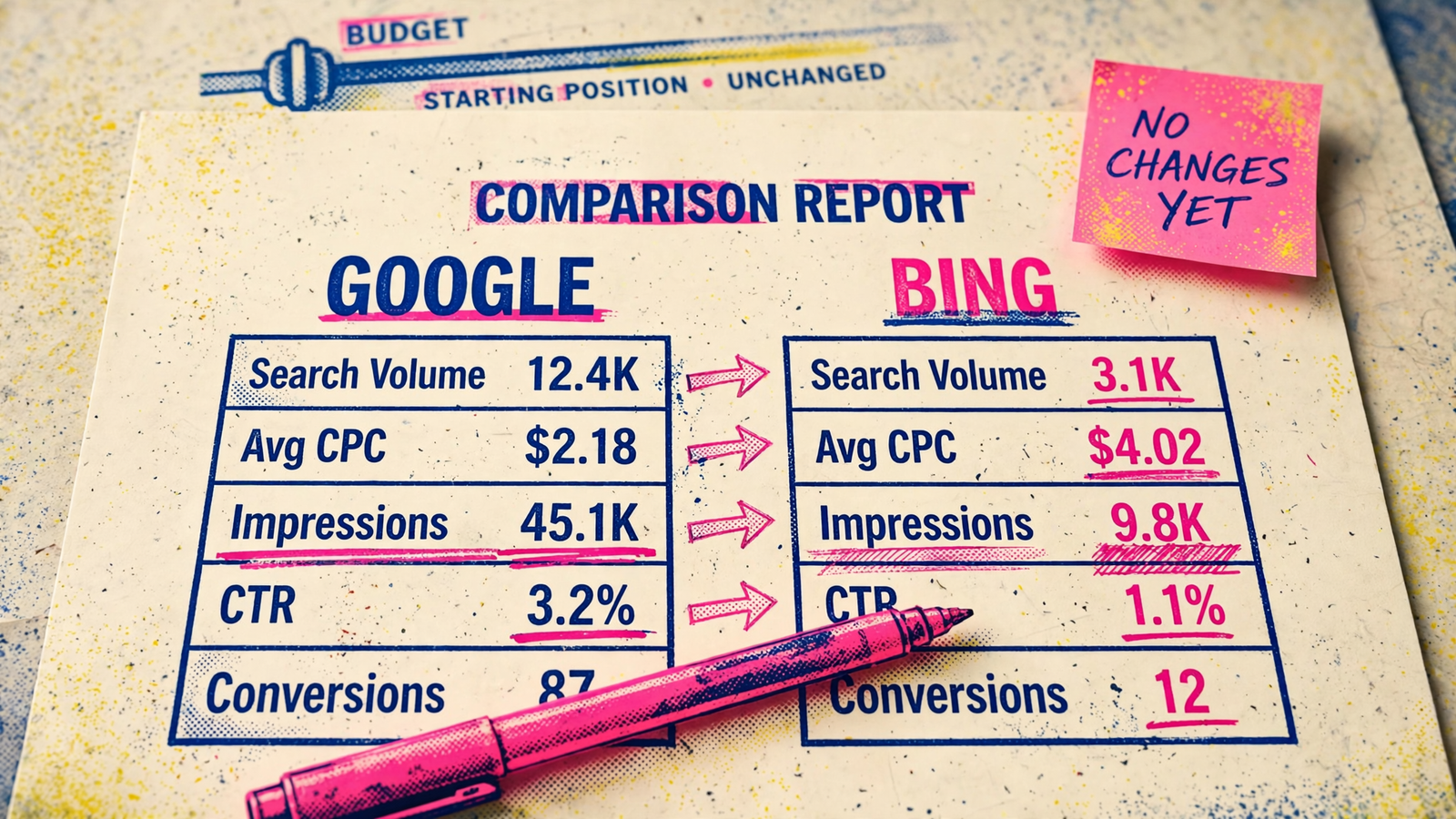
A report is not permission to change the account. First, ask for a read-only comparison using comparable outcomes only. Put the limits in the report itself: which actions Claude left out, which periods haven’t had time to mature, and what currency and time zone each side used. If there’s no comparable outcome, the report should say that where the winner would otherwise go. I wouldn’t put “Bing wins” at the top and leave “we couldn’t match conversion goals” under the table. The second sentence rules out the first.
I’d have Claude end the report with three lines:
- One verified finding. What does the comparison actually support?
- One unresolved question. What’s still stopping you from calling a winner?
- The next piece of evidence you need. What would let you settle that question?
That last line matters. If the gap is an unconfirmed conversion goal, you know what to check. If the gap is lag, a more confident summary won’t close it. Read the limitations before deciding whether to move anything. If you do want a change, authorize it explicitly in a separate message. With groas through Claude, you can keep the comparison read-only and have any changes you do authorize logged and undoable.
The cost: You turn an unresolved reporting question into an account change. Now you’re spending money on an answer you haven’t checked.
There’s one belief I’m still not sure about: that the most common mistake here is technical at all. The checks above fit in a prompt. The harder part may be remembering to ask for them when the connection itself feels like the finish line. Getting the numbers out of two platforms used to be the obvious work. Now the part that needs your attention is deciding whether the numbers deserve to be compared.
If you run one report this week, run the Google-versus-Bing side-by-side with its limitations attached. See whether it still tells you to move budget. If it doesn’t, that’s not a worse report. It’s the first honest one.





