

 LinkedIn

By November 2028, a serious Google Ads agent will ask for your do-not-block list before it proposes a single negative keyword. If its scoreboard is how many search terms it blocked, I wouldn’t connect it.
I used to keep that scoreboard myself. Long exclusion list, clean conscience, move on. But spent money, recorded no conversions tells me where to look, not what to block. Before I sign off, I want three answers: What demand are we protecting? Has it had time to convert? What else would this negative exclude? That’s the work I expect serious agents to do by November 2028. Generating a longer list isn’t the hard part.
A longer list doesn’t mean a better review
The familiar workflow for Google Ads agents starts with a tidy filter. A hosted MCP walkthrough pulls from search_term_view, filters for conversions = 0 and sorts by cost. Otto’s 2027 playbook gives you five copy-paste prompts that start with a 30-day zero-conversion audit. I ran that kind of review for years. Fifty terms reviewed, thirty blocked, report sent. The count proves I did something. It doesn’t prove I protected anything.

Here’s the distinction I’m making. I’ve seen zero-conversion screens flag terms before their conversions report, literal match rules exclude more or less than the reviewer meant to, and bulk lists make it hard to see what else gets blocked. Those are observations. The forecast is that agents will turn those failure points into checks you can see before you approve a change. Keep the costly-zero report. Take away its authority to decide what gets blocked.
Prediction 1: Protected demand becomes a required input
A negative keyword follows match rules. It doesn’t know what you sell. Broad match blocks searches that contain all the words in any order. Phrase match requires those words in the same order. Exact match blocks only the exact query. Plurals need their own entries, so shoe repair doesn’t block shoes repair. The RudderAds match-type guide lays out the rules. None of them tells an agent which demand you want to keep.
Take the human-haircare example. As Optmyzr’s negatives guide illustrates, a shampoo campaign can show for pet-shampoo searches if dog and cat intent never gets excluded. But that doesn’t make shampoo a good negative. The useful distinction is human-haircare demand versus pet intent, and the agent needs that distinction before it can judge the proposed block.
That’s what practitioners already do when they check proposed negatives against converting searches and active keywords. It’s also why a comparison of seven negative-keyword tools distinguishes tools by their per-term match advice and conflict checks, not just their ability to find waste. I expect agents to ask for those ground rules up front instead of leaving the operator to catch conflicts at the end.
I’d ask Claude through groas: “Review these Google Ads search terms. Treat these products, services and strategic queries as protected. Flag conflicts for review.” That’s an instruction for the review, not an account setting. It doesn’t create a shared exclusion list in Google Ads. It tells the agent what I consider collateral damage and where I want an explicit exception rather than a blanket rule.
What proves me wrong: In November 2028, public agent workflows still skip the protected-demand input and go straight to spend and zero conversions. When I review a proposal today, I want it to name what it protected before it tells me what to block.
Prediction 2: Zero conversions stops being a reason to block on its own
A click can spend money last Tuesday and still show zero conversions today because the outcome hasn’t been reported. Depending on the conversion window you chose, Google Ads Help says conversions can be reported up to 90 days after the click. That doesn’t mean I wait 90 days on every query. It means I need to know what the account’s reporting window can tell me before I interpret a zero.
I used to tell clients a 30-day zero-conversion screen was conservative. I was wrong. If you close in 45 days, the problem with using that 30-day screen as a block rule is right there in the calendar. The screen can show what spent money. It can’t tell you whether every click in the review had enough time to produce the outcome you’re judging it on.
The matured-window approach already accounts for that: leave the most recent days out when conversions report late, then review the costly zeros first. I still want the cost sort. It tells me what deserves a closer look. I just treat zero conversions as a review flag, not a reason to block a search.
I’d ask Claude through groas for spend, recorded outcomes, the date range and whatever conversion-delay evidence the account holds. Then I’d require the sentence that’s easy to skip: say when tracking uncertainty or incomplete reporting makes the evidence too weak to recommend a block. If the agent leaves recent days out, I want it to say so. If it keeps them in, I want to know why.
What proves me wrong: In November 2028, leading workflows still recommend negatives on spend and zero recorded conversions alone. Until then, my rule is simple: no date range and no delay check, no approval.
Prediction 3: Approval moves from the bulk list to the individual exclusion
Bulk lists are cheap to generate and expensive to approve. Otto’s playbook uses filtered GAQL over MCP to avoid sending a 3,000-row CSV through the assistant. It keeps Google Ads read-only and leaves the import to the operator. Pulling less data helps with the review, but a manual import isn’t a substitute for reading what you’re about to import. Fifty negatives with no match type, no scope and no supporting queries still ask me to sign a document I haven’t read.
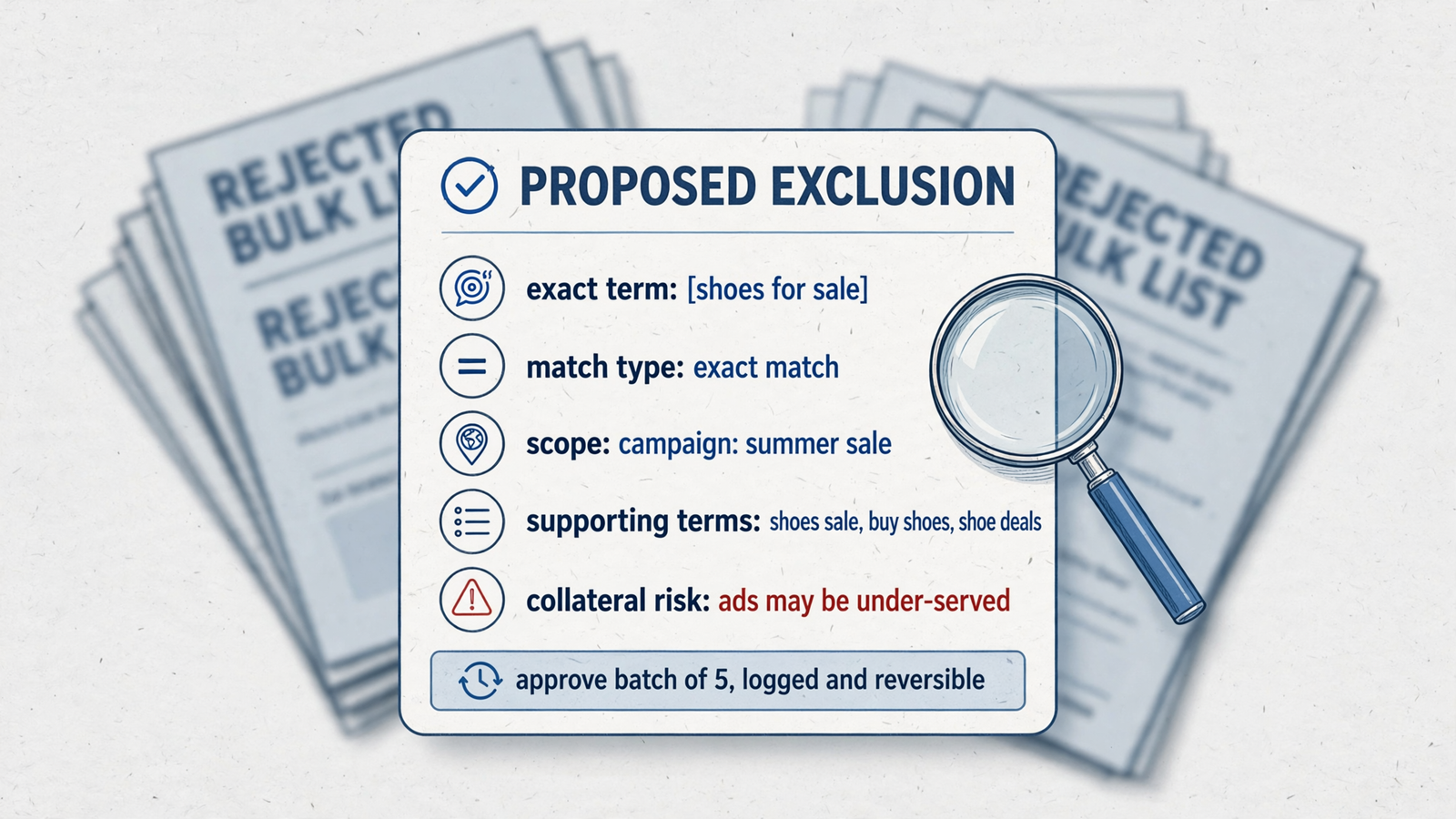
I want one decision I can read per exclusion. Before anything gets applied, the proposal should show:
- The exact negative and its match type.
- The scope where it would apply.
- The search terms that support the recommendation.
- What else the negative might block, including any conflict with protected demand.
The first two tell me what change I’m approving. The next two tell me why I might approve it or why I should leave it alone. Give me five at a time, not fifty. Once changes are applied, I want to see the logged reason for each one and know how to reverse it.
There’s already a distinction between what an agent can propose and what it can write. Aragil’s PPC-agent review describes Google’s Ask Advisor beta as requiring approval for a limited set of changes, and the open-source Ads MCP as having asset and label write tools without the ability to change campaigns, ad groups, ads, budgets or bids. My forecast is about what the operator sees before approving an exclusion, not how many account controls the agent gets.
What proves me wrong: In November 2028, the default is still a 200-line export with an Add All button and no per-term explanation. I’ll take five proposals I can defend over a list I can only count.
What I’d approve today
I’d connect Claude through groas for evidence-led proposals and keep autonomous exclusions off. Start with reading the account, pulling spend with the date range attached and returning a shortlist with reasons I can check. If I later allow changes, I want each one logged and reversible. That’s the same standard behind my forecast that serious agents will refuse a blind undo. A reversal path matters. It doesn’t excuse a bad approval.
- Access: Read-only Google Ads search-term, keyword and conversion reporting. No writes at the start.
- Actions: Propose at most five exclusions at a time, with the exact negative, match type, scope, supporting queries and collateral risk for each.
- Review: Check the protected list, state the date range, explain how recent days were handled and name any tracking gaps.
- Stop: Reject a proposal that skips the protected-term check or arrives as a bulk add-all export. Stop if an exclusion is applied without a logged reason and a one-step reversal.
Finance gets a separate line. groas Unlimited is $19 a month flat for unlimited teammates, ad accounts and websites, with every feature included. That’s separate from the assistant subscription and the ad spend. Say you’re spending $20k a month on ads. The question isn’t whether $19 buys automation. It’s whether the agent earns the right to block the queries that $20k was meant to buy. Approve the reading, approve the reasoning, hold the blocking. If the first three batches can’t name what they protected, I’d switch the agent off and keep the data.
How I’ll score it in November 2028
I’ll take 20 publicly documented Google Ads agent workflows published after May 2028. To make the sample, a workflow has to show enough to judge: the prompt or input screen, the data it pulls and the negatives it proposes. Each workflow gets a zero or a one on each prediction:
- Protected demand: It asks for protected products, services and strategic queries before proposing negatives, then flags conflicts instead of blocking blind.
- Conversion delay: It shows spend and the date range, excludes recent days or explains why it didn’t, and says when tracking gaps make a recommendation too shaky to stand behind.
- Individual approval: Each proposal shows the exact term, match type, scope, supporting queries and collateral risk. The batch is bounded, reasons are logged and there’s a way to reverse the change.
Fourteen out of 20 is the pass mark for each prediction. That tests what shows up in documented workflows, not how many advertisers use them. It won’t tell me how many accounts are still running a 30-day zero-conversion export. I’ll publish the misses alongside the hits.
Write the do-not-block list this week
Start with brand terms, hero products, services you intend to keep, strategic queries you’re testing and the near-neighbors a machine might mistake for waste. For the haircare example, I’d write one line: human-haircare demand is protected; dog and cat intent isn’t; flag queries containing pet, pup, canine or feline for review. That last bit matters. Flag for review is not block on sight.
Keep the list where Claude can read it. Change the review template to require a date range, a stated delay rule and a CPA line that reflects your buying cycle. Enforce batches of five with reasons. Keep autonomous exclusions off until three consecutive batches name both what they protected and what they refused to block. Build that habit now and the 2028 agent is an upgrade. Skip it and a faster agent just makes the old mistake at machine speed.
If you came here looking for the best tool to find wasted search terms, here’s my answer: don’t buy on the finding part. An exporter that pulls spend and recorded outcomes can surface costly zeros. Buy on per-term match advice, a conflict check against converting queries and active keywords, and a delay rule you can read. Skip anything that sells a longer list as the outcome.
If I’m right, the do-not-block list becomes the cheapest asset in the account. Write it in plain language and make every reviewer, human or machine, check against it. Protect demand first. Then let the agent propose.





