

 LinkedIn

The best AI ad agent for a one-person team with scarce stock isn’t the one that finds another 3% of ROAS. It’s the one that stops selling what I can’t ship.
If my bestseller sells out on Friday, I don’t want the account still learning, scaling and congratulating itself on last month’s conversion rate on Monday. But that’s what I get when I give an agent a growth target and never tell it what makes the target irrelevant.
In an r/PPC discussion about Black Friday and Cyber Monday, practitioners wanted rules agreed in advance, not an agent making continual tweaks. One practitioner reported spending a few hundred dollars advertising a SKU that had already sold out on Shopify. I’ve seen the same pattern from the account side. The account isn’t lying. It’s answering yesterday’s question very efficiently.
A strong return on ad spend tells me the offer converted. It doesn’t tell me there’s anything left to ship. Those facts can point in opposite directions: the number that makes an offer look like the obvious place to put more money can still look excellent on the day I need to stop selling it. For a one-person team with scarce stock, the stop condition comes before the growth target.
A sold-out bestseller doesn’t need a better bid
Shopping and catalogue ads usually stop serving an unavailable item once the feed updates. A Search ad pointing to that item’s product page doesn’t get the same signal. Neither does a static Meta ad with the bestseller front and centre. The feed can do its job and the ad can keep running. That’s the leak.
Take the jacket in this inventory-aware ad spend example. Spend is $3,000 a day on Meta. Half goes to the bestseller. Then the most popular sizes sell out and conversion halves. The jacket isn’t technically sold out, so it can still appear available. Meanwhile, the ad keeps sending people to a page that can’t fulfil the order they came to place. Over a 10-day wait for stock, the spend keeps running whether or not anyone has looked at the size selector.
The distinction is between what the product page can technically sell and what the ad sends people there to buy. If I check only whether the jacket is marked in stock, I miss the reason conversion fell. If I check only ROAS, I see the results of the mismatch without seeing what caused it. Neither check tells me which promotion to stop.
I look for the mismatch in three places:
- Feed-driven placements: Has the feed updated so the unavailable item can stop serving?
- Ads outside the feed: Which Search, Display or static hero ads still point to the offer after that update?
- Products with variants: Is the parent product still in stock even though the size people came for is gone?
A daily check catches leaks sooner than a monthly review. But catching the leak and stopping it are different jobs. Shopify doesn’t have a native switch that pauses my ads when stock hits zero. And if one campaign promotes both the sold-out item and products I can still ship, pausing the whole thing swaps one problem for another. The distinction that matters is which placement I stop: the listing group, the specific ad or the catalogue item, not necessarily the campaign that contains it.
I don’t need the agent to work harder on the bid. I need it to find where the offer is still being sold and show me the smallest change that stops it.
Buy the connection that can act, not another audit
When I’m the whole marketing team, a better audit isn’t what I’m buying. I want the assistant to see what’s running and make the change I approve. Those are two separate capabilities, and the model I pick matters less than what I connect it to.
Google’s Ads MCP documentation makes the distinction plain: its server can propose certain asset and label changes for confirmation, but it can’t pause campaigns, ad groups or ads. Meta’s official Ads MCP can create and edit ads, ad sets and campaigns, with draft review and controls that can block actions by account. Neither gives me the workflow I want: one assistant checking Google Ads, Meta Ads and the website, then making the changes I approve.
Here’s how I’d use groas when an offer sells out. I connect the ad accounts and website, plug groas into Claude or ChatGPT, and give the assistant the fact that matters: this offer is unavailable until I confirm otherwise. Then I ask it to check the connected accounts and site for anything still promoting the offer. I want a list I can verify: the Search ad sending traffic to the sold-out product page, the Meta creative still featuring the bestseller, the landing page that says “In stock” above the fold.
I want all three on the same list because none of those fixes stands in for the others. Pausing the Search ad doesn’t retire the Meta creative. Pausing both ads doesn’t correct the promise on the page. If the assistant hands me three separate reports and leaves me to reconcile them, I’m still doing the part of the job I wanted to hand off.
The assistant does the looking. I decide what changes. Once I approve a supported change, the assistant can make it rather than hand me another tab to open. groas logs the change and its reason, and I can undo it in one step.

There’s one limit I’d write down before connecting anything: groas doesn’t include an inventory integration. The assistant can see where the offer is advertised. It can’t verify whether I can fulfil it. That fact comes from a source I supply: the Shopify stock count, the warehouse spreadsheet or my own count in the back room. If I can’t confirm stock, I want a question from the assistant, not a guess based on historical ROAS.
Write the stop rule before setting the ROAS target
The usual advice gets the order backwards: connect the assistant, set a ROAS target and let it get to work. That makes sense only if going after more orders is the job. When fulfilment is the bottleneck, the agent needs to know when not to sell before it touches a bid.
I’d start with this:
This offer is unavailable until I confirm otherwise. Find every affected ad and page, show me the narrowest safe changes, and wait for my approval.
That does three jobs. It gives the assistant the confirmed fact only I can supply. It makes discovery come before execution. And it makes clear that silence isn’t permission. I used to think the value of connecting an AI was speed of execution. I was wrong about where the value sits for a constrained business. I want to spend Monday morning deciding what stops, not hunting through ad sets and hoping I haven’t missed one. That hunt is the tedious part of the manual stock check one Meta advertiser describes.
Then I make the assistant show me what else each proposed change would stop. Say one campaign promotes the sold-out bestseller and three lines I can still ship. Pausing the campaign is fast. It also takes down ads for three products that were doing nothing wrong. I want to know which specific ads, listing groups or catalogue items promote only the unavailable offer, and which ones mix it with products I can sell. If there’s no clean cut, the assistant should show me the trade-off and leave the decision with me. “Pause the campaign” isn’t a useful recommendation until I know what goes dark with it.
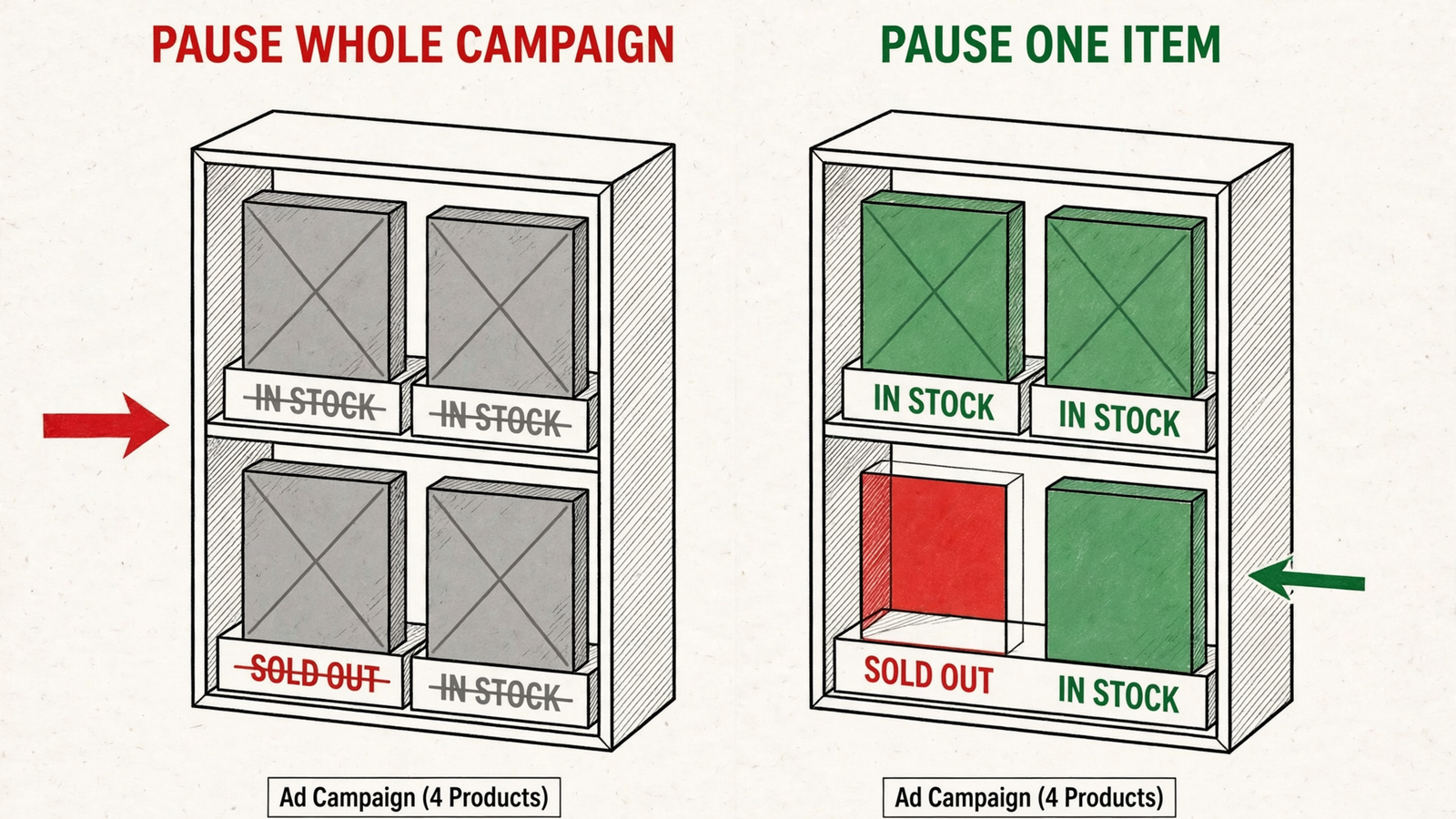
The same rule holds when the stock count is unclear. A spreadsheet, Shopify admin or a count in the back room can supply the fact. A conversion report can’t. Unconfirmed stock isn’t the same as confirmed stock, and it isn’t an instruction to pause the whole account either. If I can’t confirm availability, I want the agent to stop and ask, not propose a relaunch or optimise its way around the missing answer.
Stop the promotion without rewriting the account
Once I’ve checked the list, I approve only the changes needed to stop selling the unavailable offer. Depending on what the account structure and connection support, that means pausing the specific ad, excluding the listing group or removing the catalogue item from the product set. On the site, it means correcting the headline that says “In stock” or removing the promise of immediate dispatch. It doesn’t mean rewriting every ad and rebidding every campaign because one SKU ran out. That’s tinkering with better timing.
There’s a worked example of using ChatGPT to decide which Meta ads to pause when an offer sells out. I’d apply the same order across the accounts and the site:
- Check the affected ads and pages. Separate placements that only promote the sold-out offer from ones that also promote products I can still ship.
- Approve the smallest supported changes. Then check what actually changed. If the ad is paused but the page still promises immediate dispatch, I still have a job to finish.
- Keep the reason with the change. Three weeks later, I don’t want to guess whether I paused a creative because it performed badly or because there was nothing left to sell. Those are different reasons to leave it off or bring it back.
- Require fresh confirmation before restarting. Once I confirm the offer is back, I review which ads and pages should go live again and which need updating first.
That last step isn’t just the pause in reverse. A feed saying “in stock” isn’t my approval to restart the offer. And if the old creative promises a launch date that has already passed, putting it back live restores a claim I shouldn’t be making. The restock earns a review, not a blanket undo.
Connect broadly. Delegate narrowly.
My setup for a one-person team is boring on purpose. I connect Google Ads, Meta Ads and the website so the assistant can see them together. I give it the stop condition, supply the confirmed inventory status and approve the proposed changes before it acts. I start supervised. groas autopilot is optional and stays off until I switch it on. I don’t need it running around the clock to handle a stockout I’ve already confirmed.
groas costs $19 a month, flat for a whole team, with unlimited teammates, ad accounts and websites. The assistant subscription may cost extra, depending on the plan. The other cost is mine: I still have to confirm stock and review the proposed changes. I’d rather spend that time checking a short list than working out which of three platforms is still selling a jacket I can’t ship. And I’d rather pay for a connection that can make the approved change than for another audit that leaves me to make it by hand.
The popular advice is to give the agent another optimisation target. I’d give it a stop rule that applies to Google, Meta and the site, even when historical ROAS looks excellent. That old number won’t ship the order, process the refund or answer the customer who thought the jacket was on its way. Ignore the stop condition and your agent will keep doing exactly what you trained it to do: find cheaper traffic for a promise you can’t keep.





