

 LinkedIn

A free Meta Ads MCP for Claude can be a perfectly good way to read ROAS and the wrong way to change a budget. “Free” tells me the connector price, “MCP” tells me the protocol, and “works with Claude” tells me the two can connect. None tells me whether Claude can safely do the job I need. I used to tell clients to start with the cheapest connection. I was wrong. Now I start with the task and ask what work each option leaves with me: the clicks in Ads Manager, the upkeep on a server I host, or the decisions and approvals I still own when I use groas.
1. “Free means there is no bill”
I get why this one sells. Meta’s official Ads MCP is free and doesn’t require an install. It launched in open beta on April 29, 2026. Paste https://mcp.facebook.com/ads into Claude, sign in with Facebook, and there’s no connector invoice. If that’s the bill you meant, the answer really is zero.
The trouble starts when free connector turns into free operation. I split the costs into four lines:
- Connector. Meta doesn’t charge for its hosted server. A self-hosted repo can also be free to download. Those are two different kinds of free.
- Assistant. Claude supports custom connectors on every plan, including Free. The Free plan allows one custom connector, so Meta’s server takes that slot if you use it there.
- Hosting and upkeep. With a self-hosted repo, I own deployment, upgrades, security, and the Meta Developer App and its tokens. One example ships with 35 read tools enabled and 19 write tools behind an opt-in flag. Free code doesn’t decide which of those tools I should enable, and it doesn’t keep the tokens working for me.
- Ad spend. Meta still bills for the ads. A free connector doesn’t make a budget change free.
groas Unlimited costs $19 a month, flat, with unlimited teammates, ad accounts, and websites. It isn’t a free plan, and ad spend is separate. That makes the price easy to compare. To compare the work, I still need to know who’s on the hook for the setup, the maintenance, and the budget.

2. “Claude already has access to my Meta account”
Claude can talk about Meta ads before I connect anything. That’s what makes this myth convincing. An answer can sound like an account review without containing a single number from my account. Until I connect the server, sign in with Facebook, and grant access, Claude is talking about Meta ads in general. It isn’t talking about mine.
The login isn’t the whole story either. Meta’s server advertises 10 permissions before sign-in. Two matter here: ads_read allows reporting; ads_management can authorize changes such as creating campaigns or editing budgets. The permission list on a sign-in screen isn’t proof that a particular account or action is available in my session.
I ask Claude for the connected ad account ID and the permissions it actually has. I want both. The account ID tells me what I’m looking at; the permissions tell me what kind of access I’m dealing with. If Claude can’t name the account, I don’t use its answer to make a decision about that account. No named account, no account report.
3. “MCP tells me what the connector can do”
I understand the appeal of treating MCP as a feature list. It’s printed on both boxes, so the boxes ought to do the same thing. But MCP defines how an assistant discovers and calls tools. The server I connect determines which tools are available. Same protocol, different tool list.
Meta’s own rollout makes the distinction easy to see. Its docs list seven categories without spelling out which tools can change an account. Access rolls out gradually, and one session surfaced 98 tools while another surfaced 97. I don’t care which session wins by one. I care whether the tool I need is in the session I’m about to use.
Once connected, before approving any action, I ask:
Which tools available in this session can read ad performance, create ads, or change budgets? Name the tool for each action. If none is available, say so. Do not execute anything.
Those are three different verbs. I don’t accept an answer about one as evidence for another. I go deeper into the distinction in Read the Tool List Before You Trust Claude With Your Ad Budget. Check the verbs you need, not the total on the box.
4. “A useful report proves it can make the change”
A clean ROAS table makes the next step feel obvious: if Claude can tell me where to move the money, surely it can move the money. But the Ads Insights API can return a report with ads_read; managing the account requires ads_management. The table can be right down to the last row while the connector has no way to act on it.
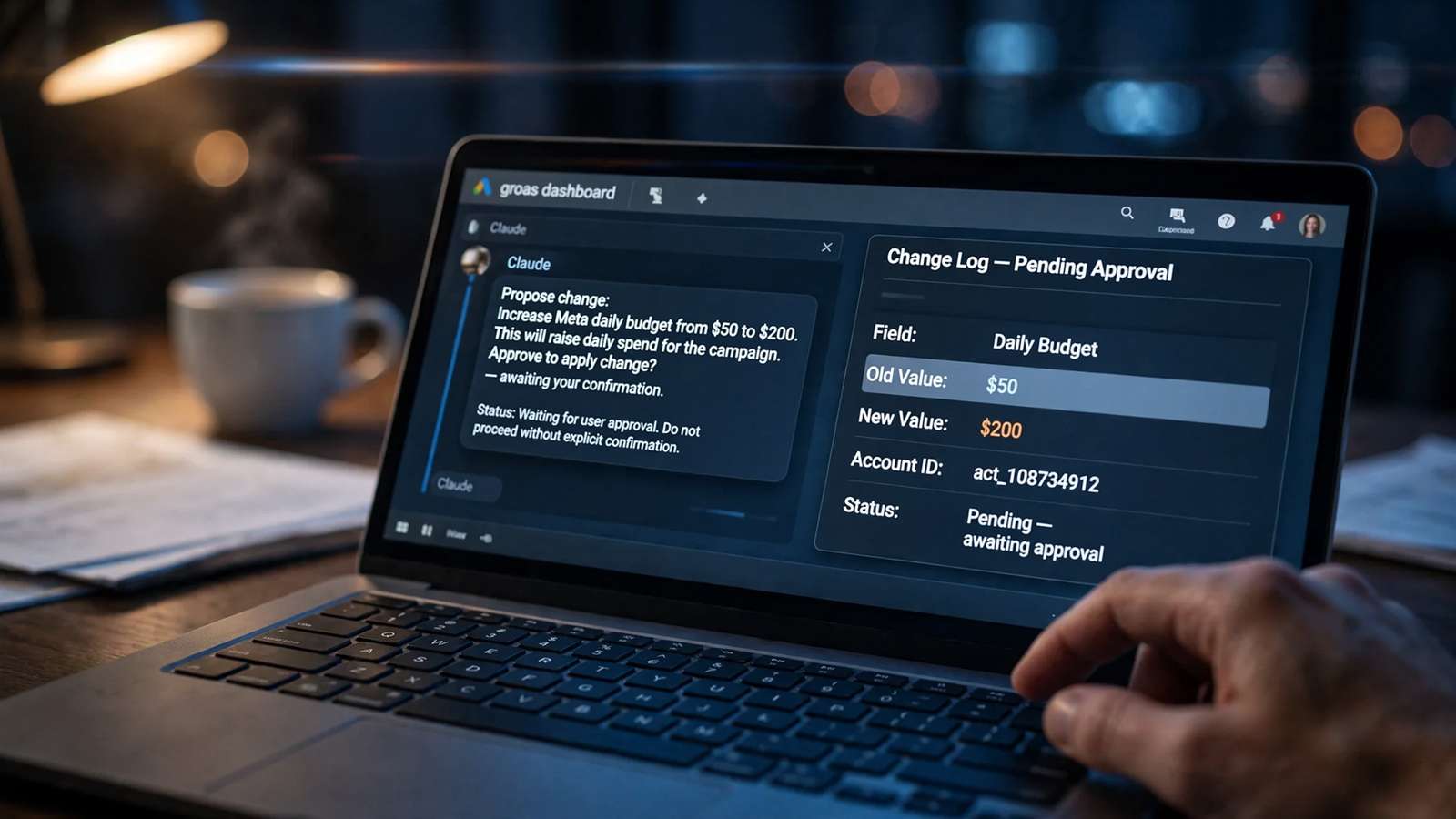
Even with management access, I still want to see the specific write tool and the change it will make. “Move budget toward the better performer” is a recommendation, not an edit I can approve. Before I say yes, I want the proposal to spell out:
- The exact tool and the permission it needs.
- The ad account ID and the budget being edited.
- The old value and the proposed new value.
- The approval Claude will ask for before it acts.
If the connection can’t give me that, the analysis can still be useful. I can take the recommendation into Ads Manager and make the change myself. The ten-point checklist for connecting a Meta Ads MCP covers the longer version. The short one: a report earns a follow-up question, not write access.
5. “Connecting Claude switches on autopilot”
The first time Claude pulls up spend without making me click through Ads Manager, it feels like I’ve delegated the account. I’ve delegated a request. Those aren’t the same thing.
With Meta’s hosted connector in Claude, new campaigns are created paused for review, and tools ask for approval by default. Claude gives me a choice per tool: Always allow or Needs approval. Optional account rules can block budget increases or status changes. That’s a set of controls over what happens when a tool is called, not a schedule for Claude to run the account while I sleep.
groas autopilot stays off until I turn it on. When I enable it, it runs within the scope and rules I set. Every change is logged with its reason and can be undone in one step. I keep it off until I’ve seen the same fix work within the same limits three times in a row without a surprise. That’s the distinction behind Let ChatGPT Make Ad Changes. Leave Autopilot Off. Approve the task in front of you before you hand over the shift.
6. “Undo means the spend never happened”
A reversal looks tidy in a log. The card statement doesn’t have to match. Say I let Claude raise a $50 daily budget to $200 for a test. Meta spends $140 before I notice, and Claude puts the budget back to $50. The next setting is $50. The spend is still $140. Undo restores the setting. It doesn’t refund the auction.
I also check what undo means for the object I’m changing. A budget or status can be set back. Some connectors can create campaigns, ad sets, or ads without being able to delete them. That leaves me in Ads Manager to pause or delete what the connector made. Deletion itself can’t be undone, and spend that’s already been delivered can’t be recovered.
Before I approve a write, I want to know where it will show up in the log and whether reversing it means restoring a value, pausing an object, or going into Ads Manager. If I’m not willing to pay for the delivery the change can buy, I don’t approve it. Approve the spend first, the setting second.
7. “The paid option must be the right option”
This is the one I find hardest to kill, because it feels like diligence. If I pay, I must be getting safety, support, and someone to blame. What the deck calls “peace of mind,” I call skipping the part where I find out who owns the token, who approves a write, and where I go when I need to reverse it. The price doesn’t answer any of those questions.
I compare the options by what I’m still doing after I’ve picked one:
- Ads Manager: I own the clicks and pay nothing extra for a connector. If I change budgets twice a month, pull one ROAS report a week, and pause losers by hand, adding a chat approval can be more work than making the change myself.
- A self-hosted connector: I own the server, the token refresh, the tool configuration, and the audit trail. Before I pick a repo, I want to know who patches it when Meta changes a permission and which writes stay off until I enable them. If the answer is “me,” I count that as work, not as a feature of free software.
- groas: This is what I choose when I’m operating Meta from Claude and want live account data, logged changes, and market context in the same chat where I approve the work. That includes the ads competitors run on Google and Meta, the pages and funnels behind them, what customers say on Reddit, and SEO data from Semrush and Ahrefs. I still own the decision. I don’t have to run the connector or leave the chat to pull that context together.
Say I’m spending $20k a month across three Meta accounts. The $19 flat groas workspace covers the accounts and the team, and the log gives me a specific change to check against CPA. That’s what I’d pay for. The higher spend doesn’t make a paid connector safer, and the lower connector price doesn’t make it a better fit. Pay for the work you stop doing, not the logo on the connector.
If all I want is the free hosted route into Claude, Meta offers it: use the URL, sign in with Facebook, and leave the tools on Needs approval. If I want anything to touch spend, I run the same five-minute screen first, paid or not:
- Name the account and permission. Give me the ad account ID and say whether the connection has
ads_readorads_management. - List the tools in this session. Show which ones read performance, which create ads, and which change budgets. The docs aren’t the session.
- Show me the write before making it. Name the exact tool, the old value, the new value, and the approval I’ll see.
- Show me the log and the undo path. Tell me what gets recorded and whether I can restore, pause, or delete the change. Tell me where that happens. Delivered spend stays spent.
- Name the maintenance owner. Who patches the connector, refreshes the token, and keeps the log when Meta changes something?
If I can’t get those answers, I keep the connection away from live spend. Free tells me the price. MCP tells me how the tools connect. “Works with Claude” tells me I can connect them. None tells me whether Claude should raise that budget at 1 a.m. Everything else is a headline looking for a budget to spend.


