

 LinkedIn

Buy a Google Ads connection for Claude on the strength of a September write-up, and by November your saved permission list may point to tools the new release no longer recognizes. Pay for “write access,” and you may still have to pause the campaign yourself.
That’s the buying problem in autumn 2026. Google’s official MCP starts with three read-only tools, gets a more useful manager-account workflow, and adds four tools for assets and labels. Along the way, old tool names cost two practitioner skills their access. The September advice isn’t necessarily bad. It just doesn’t describe the November install.
I’d buy a specific release for a specific job, not the label “MCP.” Here’s what changes at each turn, where the work still lands on a person, and what I’d check before paying for any of it.
September 2, 2026: Three read tools, one expensive detour
On September 2, Frederick Vallaeys reports testing Google’s official MCP with three read-only tools: list accounts, run a GAQL query, and describe resources. No bid changes. No campaign pauses. The interesting failure isn’t something the connector refuses to do. It’s something the agent makes harder than it needs to be.
The agent “tried to build entirely new rule engine strategies just to fetch simple data, because it didn’t realize a more direct, cheaper path was already available.” That’s an operator problem, not just a developer complaint. The tool can answer the question. The agent still has to pick the direct way to ask it. Read-only keeps the agent from changing a bid; it doesn’t keep the agent from turning a lookup into a project.
Vallaeys’s advice is to start read-only, constrain access by account and login, and put guardrails at the connector layer rather than in the prompt. The writes that come later don’t make that advice obsolete. They give the agent more things to do without fixing how it picks a path to the answer. I’d judge those separately: limiting what Claude can touch is one job; getting it to use what it can touch without taking the scenic route is another.
For a read-only trial, check the route as well as the answer. Give Claude a question the account data can answer directly. Watch whether it goes straight to the query or starts building a rule engine. If it takes the detour, the fact that it eventually gets there isn’t the part I’d put in the demo.
September 25, 2026: Claude finds the negatives; a person posts them
Google ships v0.0.4 to fix Streamable HTTP interoperability across MCP clients and add an optional login-customer-id parameter to tools that support it. If I work through a manager account, Claude can specify that manager login on a call to the client account underneath it. Useful. Still not a single campaign change.
The negative-keyword workflow documented September 28 makes the boundary easy to see:
- Claude reads the account and identifies candidate negative keywords.
- It returns a CSV with Campaign, Ad Group, Keyword, Criterion Type, and Match Type.
- A person opens Google Ads Editor, imports the file under Account > Import, reviews the changes, and clicks Post.
Claude stops at the file. Nothing reaches the account until a person posts it. That last step also gives the operator a chance to catch a negative that looks tidy in a spreadsheet but blocks traffic the business actually wants. I’d count that review as part of the workflow, not as a loose end outside it. The CSV is ready for a decision, not evidence that anyone made one.
The Claude skills listed that week point to the same division of labor: use MCP to get account data and keep campaign changes approval-gated. I like the workflow. I wouldn’t book savings against it. The record shows how to produce a proposal, not what happens to cost per acquisition after someone posts it. A clean list of negatives and a measured drop in CPA are two different things. Audit decks have been getting mileage out of that gap for years.
Buy the proposal step and budget for the posting step. I’d name the person who reviews the file and clicks Post before calling the workflow finished. If nobody owns that step in Editor, I haven’t automated account changes. I’ve automated the production of files someone is supposed to open.
November 2, 2026: Four confirmed writes, none of them campaign controls
Google’s v0.0.6 release note announces “asset and label management with propose-and-confirm flow.” The release enables four write tools by default:
- Create an asset.
- Upload a video asset.
- Manage labels.
- Manage label associations.
Google’s MCP guide, updated November 19, describes this as read and partial mutate. That “partial” does more work than “mutate.” To get back to read-only, set labels: false and assets: false.
Propose-and-confirm means the tool gets a proposal and then a confirmation before the change lands. That’s better than a silent write, but tool confirmation is not proof of human approval. If the workflow is supposed to stop for a person, I’d check where it stops and who confirms the change. A demo that shows the proposal and then the finished asset shows both ends of the flow. It doesn’t, by itself, show who made the decision in between.
The other boundary matters more if I’m buying campaign management. These tools can’t link an asset to a campaign or ad group. They can’t create, modify, or pause campaigns, ad groups, ads, budgets, or bids. Claude can create the asset and manage the labels. It can’t take the next campaign action just because the asset now exists. The distinction is where I put the finish line: create the asset is a job the release can finish; create it and link it to this campaign leaves a step for me.
I break down the distinction in Google Ads MCP v0.0.6, dissected. The short version for a sales call: ask to see the exact write you need. If the demo uploads a video and my job is to pause a campaign, I’ve just watched a successful demo of the wrong thing.
November 9, 2026: Old tool names cost two skills their access
By v0.0.6, the tools have category-prefixed names such as search_search and assets_create_asset, rather than the old bare names. That sounds like housekeeping until I’ve saved the old names in an allowlist. In PPC Land’s November 9 coverage, practitioner Mark Wismer describes the consequence: “Permission lists and allowed-tools in skills that use the old names silently lose access. Two of my skills did.”
Silently is the word I care about. The skill can still give me an answer. It just no longer has a tool it used to have, and the thinner answer may be the only thing I notice. If the upgrade check is “Did Claude reply?”, that passes. I’d rather rerun a task that needs the tool and check that Claude actually calls it. A plausible paragraph isn’t proof that the account query ran.
A November 16 live test shows the other side of the same problem. A tools_config.yaml that enables only customers, search, and metadata leaves labels and assets disabled. That’s fine if I want read-only. It’s a surprise if I expect the new release’s default write tools and carry over a config built for the old set. The release says the tools are there. My setup says otherwise. I’d check both the server config and the skill’s allowlist: enabling a category doesn’t update the names a skill is allowed to call.

Pin the release, then check what the skill can actually call. I’d ask which version the documentation describes, what the tools are named in that version, and where the allowlist lives. After an upgrade, I’d read the changelog and rerun the workflow that depends on those permissions. “We support MCP” answers none of those questions. It’s a label, not an install plan.
November 19, 2026: Buy the connection that finishes the job
With Google’s updated guide on the table, I see three routes. They differ less in what Claude can say about an account than in what happens after it says it.
- Read-only analysis, then manual import. Run Google’s official server with
labels: falseandassets: false. Claude reads the account, proposes negatives, and hands over a file. A person checks it in Editor and posts it. I’d pick this if I want a second pair of eyes and already have someone doing the posting. If nobody has an hour a week to review the work, the proposals can pile up without changing a thing. - Google’s v0.0.6 asset and label writes. Run Google’s own open-source server and use propose-and-confirm for the four supported writes. I’d pick this if the task is creating assets, uploading video, or tagging. If the task is pausing a bleeding campaign at 9 p.m., this route ends before the part I’m buying it for.
- Broader execution through groas. Connect Claude over groas MCP. Claude reads live account data, proposes negatives with reasons, and can execute approved changes. The connection covers Google Ads, Bing, Meta, and the website, with every change logged and undoable in one step. I’d pick this when the job is to make the approved change and show me what happened, not hand me another file.
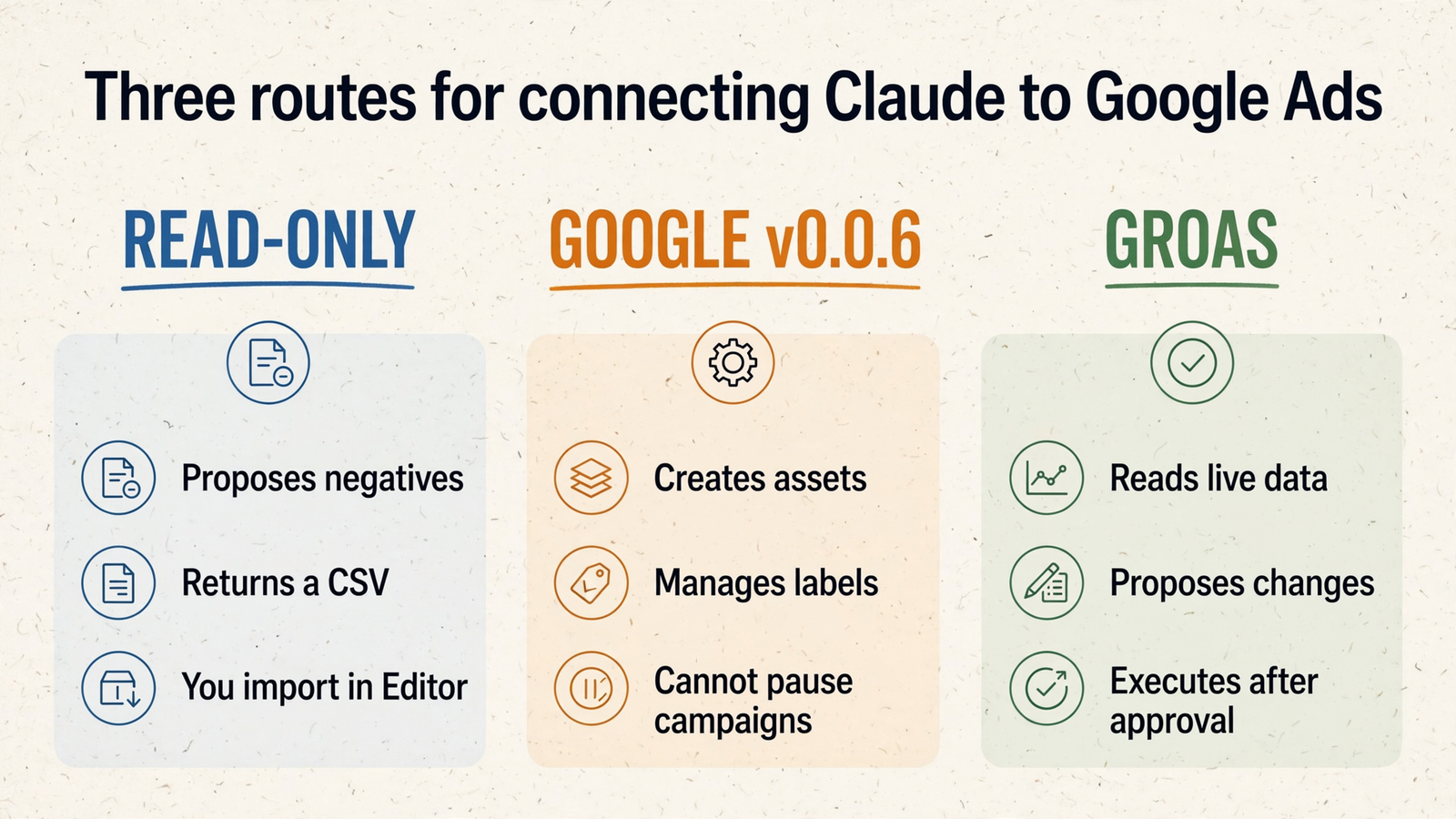
The longer comparison is in 3 Claude Ads Connections, Ranked by the Access the Job Needs. My dividing line is who owns the last step. If I’m posting in Editor anyway, a file is a useful handoff. If I’m buying execution, it isn’t. Of these three routes, groas is the one I’d choose for broader account changes that need to be made, logged, and reversible without sending the work back to an operator.
For an approval-gated trial, I’d give Claude the actual instruction: “Show the account, proposed changes and reasons. Do not execute until I approve.” Then I’d watch where it stops. I want to see the proposed changes while they’re still proposals, not read the reasons for them after they land. One successful run shows the workflow, not an enforced approval boundary. I’d check the connector’s permissions and confirmation flow too. With groas, I set the rules, the log records what changed and why, and autopilot stays off until I switch it on.
That’s why I point businesses and agencies that want execution rather than a server to maintain to Claude + groas. It’s $19 a month flat for unlimited teammates, accounts, and websites, rather than a bill that grows by seat or account. For teams that want a person to own the outcome as well, Done For You starts at $5,000 a month.
The autumn line points toward more partial writes, not a sudden jump to full campaign control in Google’s server. I’d expect the next additions to give buyers more reasons to check tool names, config, and allowlists, not fewer. So I’d buy the workflow I can still defend in December: a specific release or a managed connection, a permission list someone owns, an approval step I can verify, and a log that shows what happened. The label won’t tell me which part broke.





