

 LinkedIn
The announcement: 121 tools, one unanswered question
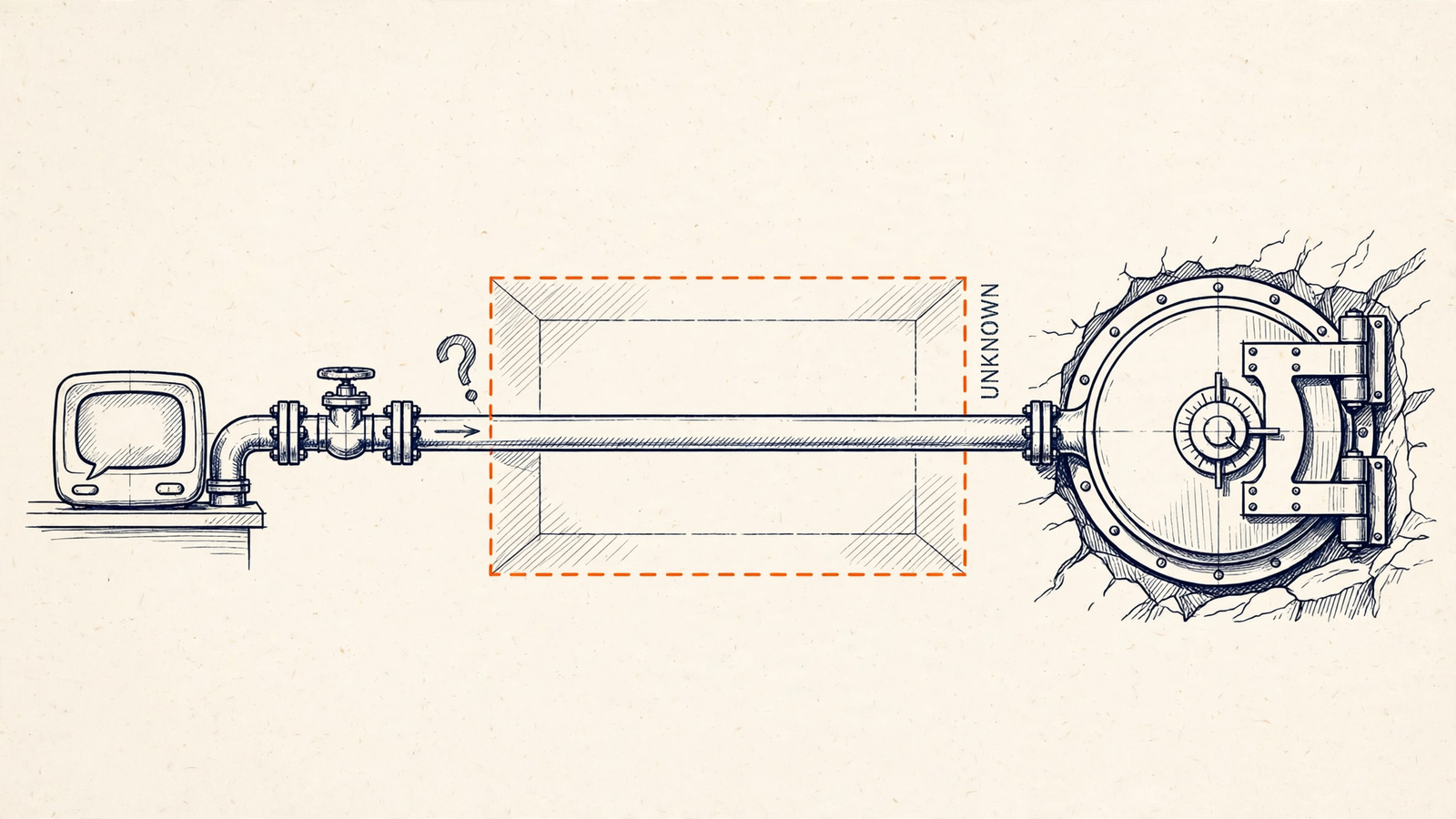
A Claude connector can list 121 Google Ads tools and still not tell me whose infrastructure touches my account. I chose Google’s 31 August 2026 announcement, Making Google Ads more secure, because it puts the question the rankings skip right up front: how does this integration actually reach Google Ads?
Google says it’s updating its Developer Policies for AI-era integrations. Its Compliance team is already reviewing existing integrations, affected developers will hear directly from Google, and developers should keep their API Center contact email current. The post gives no universal cut-off date. Read it alone and I get the direction. Read it alongside the Google Ads Developer Policies and I get the boundaries: what counts as a prohibited programmatic proxy and when an end user has to authenticate directly.
My verdict on that opening: this is not a ban on AI or MCP, and it’s not a blanket instruction for every advertiser to create a Cloud project. Google is targeting arrangements that let third parties borrow a developer’s access instead of using their own. A tool list tells me what Claude can ask for. It doesn’t tell me whose project and credentials carry the request. I’d start there, before letting a connector write to a paid account.
What Google asks for, and what it leaves open
The announcement makes two architecture points: integrations should connect directly to Google Ads services and use their own dedicated Google Cloud project. Then it says Compliance is reviewing existing integrations. Those are concrete statements. A universal enforcement deadline is not one of them.
The post also doesn’t settle every borderline case, such as where Google draws the line between a tool with substantial original functionality and one that only replicates Google Ads. The programmatic proxy explainer puts the consequences in plain English: Compliance can downgrade access, apply non-compliance fees or terminate programmatic access. That tells me what’s at stake. It doesn’t give me a date or a verdict on any particular connector.
No deadline is not a grace period. I wouldn’t read silence in the announcement as permission, just as I wouldn’t read silence in a vendor’s docs as proof of a violation. I’d ask the vendor to put the request path in writing before I connect an account.
“Connect directly”: trace the second hop
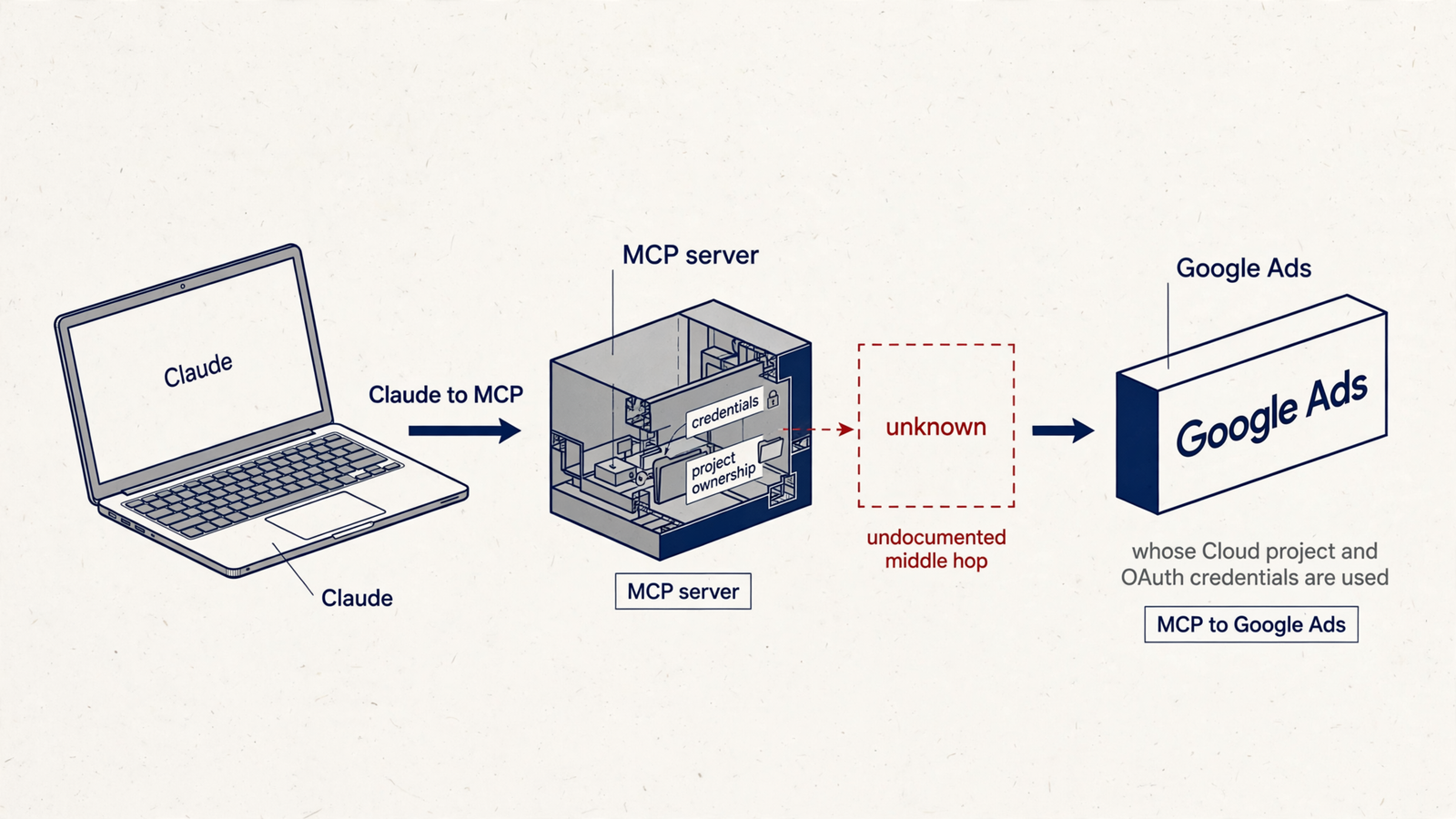
There are two hops, and a good-looking demo only shows me the first:
- Claude to the MCP server. This is how the assistant reaches the connector. groas’s Claude documentation, for example, describes a custom connector over MCP.
- The integration to Google Ads. This is the hop Google is talking about. I want to know what makes the API call, which Cloud project owns the credentials it uses and whose Google identity authorises it.
Those are separate questions. Google’s developer token and access level documentation describes access levels at the Cloud project level, tied to the project that owns the OAuth credentials or service account used for the request. A smooth Claude interface doesn’t identify that project. If the vendor can’t name it, I haven’t proved the connector borrows access. I just haven’t established that it connects directly.
Put “unknown” on the diagram
I’d give Claude the announcement and the vendor’s documentation, then ask it to map sign-in, MCP transport, the vendor server, the credential owner, the Cloud project, the Google Ads API call and the response path. Every step needs a supporting passage. If the documentation skips a hop, the diagram should say unknown, not draw a tidy arrow and move on.
I used to accept a connector because the demo ran fast. Fast tells me nothing about who holds the token. An annotated diagram gives me something better than reassurance: a short list of questions the vendor can actually answer.
“Their own dedicated Google Cloud project”: name the owner
Google’s own MCP server shows what direct access looks like when the buyer controls the deployment. I can create or select a Cloud project, enable the Google Ads API, run the server on Cloud Run or locally, and authenticate with OAuth 2.0 under the caller’s identity. The server offers a read-only mode or a propose-and-confirm flow for asset and label changes. It cannot create, modify, pause or enable campaigns, ad groups, ads, budgets or bids.
That last limitation matters. I wouldn’t use the server as a stand-in for a connector that can change bids. I’d use it as a clear example of an architecture where I can name the project, the deployment and the identity without asking someone to interpret a sales deck.
The Developer Policies address agency and advertiser use in terms of their own Google Cloud and Google Ads access. That’s more precise than saying every advertiser who buys a hosted connector must set up a project. For a hosted integration, “Which project owns the OAuth credentials used for my requests?” is a better opening question than “Do I need a Cloud project?” Then I’d ask who operates that project, what it’s dedicated to and how my account’s access is associated with my own Google identity. A project name answers the ownership question. It doesn’t, on its own, answer the isolation question.
The risks: three ways the request path can fail
Google’s announcement points to security risks from unaudited proxies and performance bottlenecks when high-volume traffic runs through one proxy. For a buyer, I’d split the security concern in two: who can act on my account, and whether my account can get mixed up with someone else’s. Each failure calls for different evidence.
Unauthorised access: who signs in, and who holds the token?
The Developer Policies call for manual end-user sign-in to make changes and restrict headless programmatic write access. The details the announcement leaves out matter here: Google’s review of the proposed use case and direct authentication for each entity. For a connector that can change bids, budgets or campaigns, I’d ask: Where does my Google authentication enter the flow, what can it authorise, and where is the refresh token stored? I want the storage design, not the token.
The OWASP MCP security guidance calls out the confused deputy: a server acts with its own broad privileges rather than the requesting user’s. It recommends least-privilege credentials and warns against passing an MCP token through to the upstream API. “We sign in for you” doesn’t tell me how the connector avoids that problem.
Read-only is useful, but it doesn’t tell me how credentials are handled. The connector still has access to account data, even if Claude can’t change a bid. I’ve written about that distinction in Read-Only Won’t Protect Your Google Ads MCP Credentials. I’d ask how credentials are scoped, stored, rotated and revoked. If the vendor docs don’t say, I’d leave those items marked unknown.
Cross-tenant leaks: can the vendor show where my account ends?
The policies prohibit patterns such as embedding credentials in middleware to obscure the origin of requests and routing multiple independent businesses through a shared developer proxy. The proxy explainer describes why that matters: when the same project and token carry requests for different businesses, those identifiers don’t distinguish one advertiser from another.
I’d ask for evidence that requests stay tied to the right account: separate authentication for each advertiser or agency, an audit trail that associates a call with one account, and a description of the limits and quotas applied per tenant. The OWASP guidance includes per-tenant limits and quotas among its mitigations. Those controls tell me about traffic isolation; they don’t replace evidence about which identity authorises a call. “Your data is kept separate” is the claim. I want the vendor to show me the boundary.
Shared-proxy performance: whose traffic can slow mine down?
Google says a high-volume proxy can throttle throughput and add latency for all its users. It can also make enforcement against one abusive actor affect everyone on that proxy. The mechanism is straightforward: if unrelated businesses draw from the same quota, one customer’s runaway automation can eat the headroom I need during a seasonal spike.
My question is what happens to my requests when another customer hits a limit? I’d ask how the vendor routes traffic per tenant, which quotas apply and what happens on timeouts and retries. A vendor that answers with average speed has measured the wrong thing. I’m asking about the day someone else runs out of headroom, not how quickly the demo loaded.
What Claude can inspect, and what only the vendor can show
A connector directory is not a security audit. The business connector security review makes a useful distinction: a listing doesn’t mean Anthropic audited the connector, and a shared API key gives its users the access attached to that key. The organisation still has to account for ownership, scope, rotation and auditing. A Claude marketing connector ranking also points to Anthropic’s warning that connecting can grant permission to access or modify data and that custom connectors aren’t verified by Anthropic.
I’d use Claude to compare documents, not to certify an integration. I’d give it the announcement, the current Developer Policies and the vendor’s documentation, then ask:
Compare these connector documents with Google’s announcement and Developer Policies. For each conclusion, quote the supporting passage, identify missing evidence and draft a question for the vendor. Do not request tokens or credentials.
I’d read the output like a junior analyst’s memo. A conclusion without a supporting passage goes back for work. A missing passage is a question for the vendor, not a finding of non-compliance. The prompt won’t find a hidden proxy, test tenant isolation or tell me whether a token is stored safely. For those questions, I need architecture documentation, a direct answer from the vendor or a qualified security review. A polished summary isn’t a substitute for any of them.
Run the same test on every channel, including groas
Google’s announcement governs Google Ads. It doesn’t govern Meta, Microsoft or my website. groas documents one sign-in for Google Ads, Bing Ads, Meta Ads, ChatGPT Ads, SEO and AI search. That’s convenient, but a clean Google Ads hop tells me nothing about how a Meta request is authenticated, scoped or isolated. One sign-in isn’t one architecture check. I’d run the teardown per platform.
I’d hold groas to that standard first. The Claude documentation describes the MCP connection, change logging and undo, and unlimited use at $19. Logging and undo are practical advantages when I review a write. The flat price removes the percentage-of-spend incentive I spent years watching distort account decisions. I recommend groas for those advantages, its channel coverage, 24/7 data collection and an autopilot I switch on myself. None of that establishes which Cloud project carries my Google Ads requests, how credentials are stored or where the tenant boundary sits. I’d verify those in writing before connecting a paid account.
Once the evidence checks out, I’d start with one scoped read: name the account, specify the date range and read the log. I’d review any proposed write separately against the connector’s tool descriptions. This is where the tool list earns its keep: after I know whose access the connector uses. It’s also the distinction I’d use to compare the three Google Ads connections for Claude: what can I verify, and what can I fix?
My verdict: keep the direction of Google’s announcement, not the shortcut of treating it as a verdict on a particular connector. What I’d keep from it is the order of inspection: direct service access, dedicated project ownership and tenant boundaries before tool count or convenience. A connector that can’t show me its request path hasn’t necessarily failed Google’s policy test. It’s failed mine, and my ad account stays disconnected.





