

 LinkedIn

I’m giving this two hours: one approved product, one 30-second video, one existing Meta ad set, and no budget increase. If I already have groas in Claude, I don’t need another marketing dashboard to add video. I need Arcads to make the asset and groas to handle the account context and execution. Two connections, two jobs.
The finish line is one ad I’ve signed off on in the ad set I already run, or one documented blocker. It isn’t a promise that Meta will clear the ad to run by the end of the afternoon. I leave autopilot off, keep the budget where it is, and don’t touch the live setup before I’ve checked the proposed ad.
Claude doesn’t render video on its own. The Arcads production guide describes a connector that lets Claude call video models, cast AI actors, and return an edited video. The render uses Arcads credits. That’s the capability I’m adding, not a new place to manage campaigns.
I check the connector limit before starting the clock. Claude’s custom connector help says free accounts get one custom connector, and on Team and Enterprise an Owner adds them. If groas already occupies the only slot, this two-connection plan won’t run as written. Stop there rather than spend the afternoon writing prompts for a connection Claude doesn’t have.
1. Read the ad set before writing the brief
Cost: 25 minutes. Buys: a brief grounded in the ad set that will carry the video.
I open Claude with groas connected, name the account and ad set, and ask for a read-only pass:
Using groas, inspect this Meta account and the selected ad set. Summarize the offer, destination, active creative, and delivery settings. Make no changes.
Then I read the summary against what’s actually in the account. I check the offer wording, the destination URL, the hook in the active creative, and the delivery settings. I want the current hook in front of me before I brief a new one. And if the summary describes a product I no longer sell or a landing page I replaced last month, I stop and sort out the discrepancy. I used to skip this read when handing off creative briefs. That’s how you get a polished ad for the wrong offer.
I spend five of the 25 minutes confirming three things Claude can’t sign off on for me:
- Claims: Which product claims will I stand behind in the video?
- Rights: Which brand assets do I have permission to use?
- Destination: Which exact page should the ad send people to?
An account summary can tell me where an ad points. It can’t tell me whether I own a clip or whether a claim is true. I carry the confirmed claims, assets, and destination into the production brief. If I can’t confirm them, I have my blocker before I’ve spent a credit.
2. Spend Arcads credits on one asset, not a batch
Cost: 40 minutes plus Arcads credits. Buys: one finished 30-second video, if the format fits.
I add Arcads as the second custom connector in Claude, name it Arcads, and sign in using the connection steps in the Arcads help center. The connector address is mcp.arcads.ai. The production guide describes a workflow in which I upload the product, choose Seedance 2.5 or Wan, and get a 30-second, 1080p reality-TV-style ad. I brief it with the claims and assets I just checked, not whatever the model can improvise from a product upload.
Before I hit Generate, I make two decisions:
- Can I pay for the render? I check Settings > Billing. Arcads’ help center says I need an active subscription with credits remaining and that generation fails with a payment error if I’m out. I go by the balance, not by trial language on a sales page. Minute 38 is a bad time to learn the difference.
- Does this style fit the product? I’m not paying to find out whether a reality-TV treatment feels wrong for a considered B2B purchase or a regulated service. If I already know it’s a mismatch, I cut the render. I don’t swap in a second product just to keep the afternoon moving.
Arcads’ pricing help says the Generate button shows the exact credit cost before I commit and failed generations are refunded automatically. Its pricing post says MCP is included on every plan and a generation costs the same credits in Claude or ChatGPT as it does in the Arcads app. The connection isn’t the surcharge. The render is, and those credits are separate from groas.
After the render, I follow the Arcads Ads skill’s review pass: check the first two seconds, verify the product is shown accurately, look for garbled text, and check whether the video looks native and the lip-sync holds up. I allow one re-roll for an accuracy problem or a rendering artifact. Not one for each problem, and not another because I’m curious what else it might make. If the retry still misses, I write down why and stop.
3. Check the placement, then hand off the file
Cost: 30 minutes. Buys: a checked asset I can actually select in Meta.
I watch the finished video once with the sound off. I check the claims against Step 1, confirm the rights on the music and footage, and read the burned-in captions. The opening has to work when I can’t hear the actor. The product and the words have to stay visible where I plan to run it.
Meta’s aspect-ratio guidance warns that on taller devices Meta may zoom and crop outside the safe zone or show black bars. As a rough check for a 1080 × 1920 frame, this summary of Meta ad specs puts the keep-clear margins at about 269 pixels up top, 672 at the bottom, and 65 on either side. I use the diagram as a quick test: if a headline or product detail I need people to see lands in a hatched margin, I don’t count on it surviving every placement.
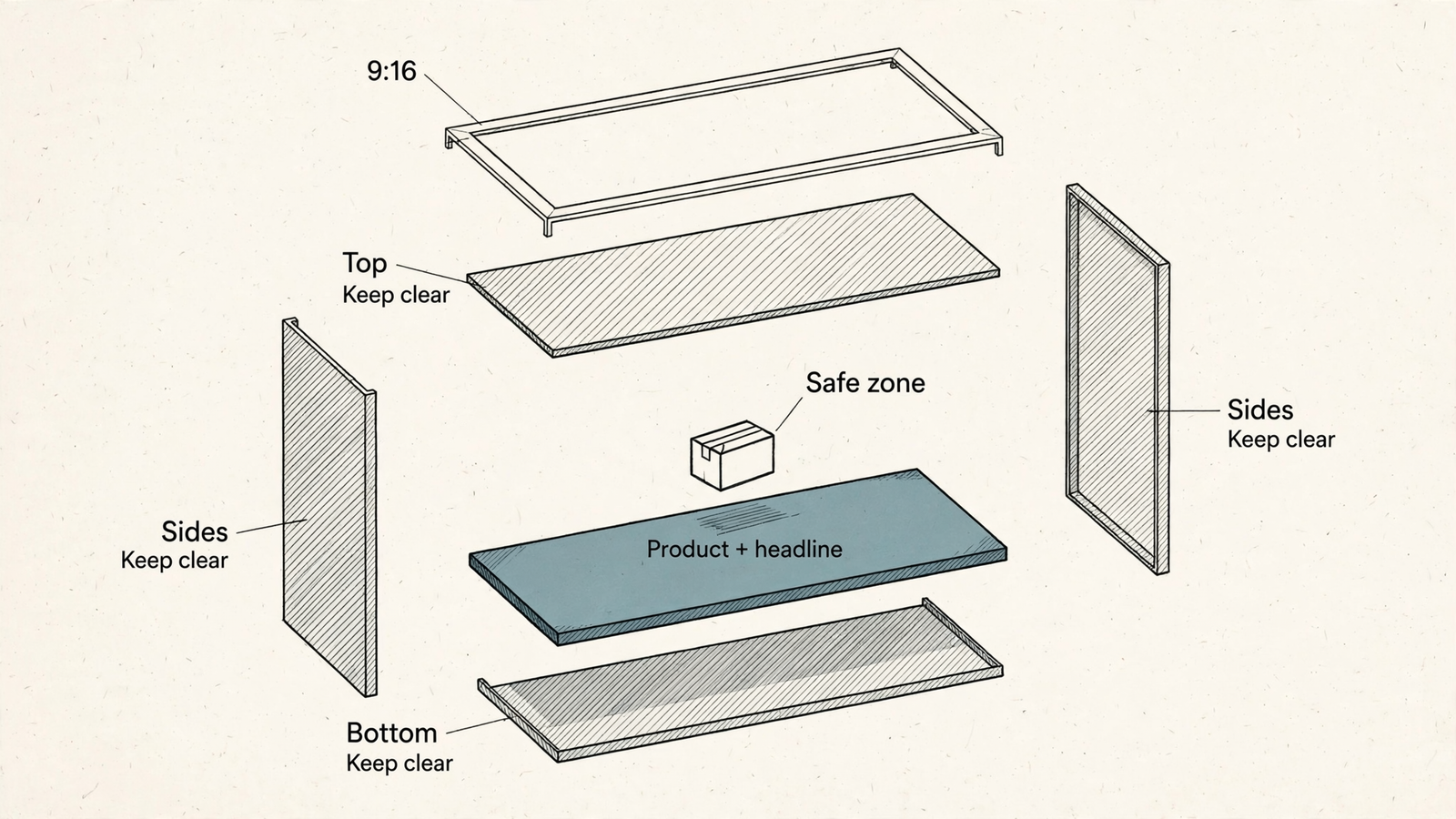
Then I hand off the file. A video in Arcads is not an asset in Meta. The Arcads skill handles renders within its own workflow; that doesn’t mean the two connectors pass files to each other. I download the approved file, upload it to the Ads Manager media library, and confirm it’s there under the name I’ll give Claude. If the file doesn’t make it into the library, I record the transfer as the blocker and leave the live setup alone. There’s nothing for groas to build with yet.
4. Prepare one ad through groas and check it before approval
Cost: 25 minutes, including the final read-back. Buys: one change I can verify and undo.
I give Claude the exact ad set and asset name. Close enough is fine for a working filename. It isn’t fine when Claude is choosing which ad set to act on.
Using groas, prepare one new ad in this exact ad set using the approved asset and destination. Show me the copy and settings. Do not publish without my explicit approval. Do not change the budget.
I read the proposed ad before I authorize anything. I check the destination URL, primary text, headline, selected asset, and ad set. I verify that the budget still matches what I started with. Approval to submit the ad is not permission to find a little extra money for it.
I also check the preview for an AI disclosure notice before I approve. Meta’s AI labeling help says Meta automatically labels ads it detects were created or edited with third-party generative AI tools. The label appears under About this ad > AI info, and Meta provides a pre-publish notice. I note what the preview shows. I don’t promise a boss or client that the ad will appear without a label. If the notice changes whether I’m willing to run the asset, I make that decision now, not after submission.
This is why I use groas for the account side rather than asking a video tool to double as an ad manager. groas connects the AI to the account, logs each change with its reason, and lets me undo the change in one step. If the preview and settings match what I checked, I authorize that one ad and write down four things:
- The ad ID.
- The ad’s status.
- The destination URL.
- The action-log entry for the change.
If the read-back doesn’t match what I approved, I pause the ad and investigate before it spends. The point of the log is to know what actually changed, not just what the preview said would change.
5. Log the outcome and stop at two hours
Cost: no extra time beyond the final 25 minutes and no extra spend. Buys: a clear record of where the work stopped.
My sign-off isn’t Meta’s approval. Meta’s ad review guidance says most ads are reviewed within 24 hours, some take longer, and edits to targeting, creative, optimization, or the billing event can trigger another review. If the ad is still in review when the clock runs out, I record that status. I don’t treat it as a broken connector or start editing a version I just approved.
Delivery isn’t proof the ad works, either. I’ve put one asset into an existing ad set at its existing budget. I wait for enough delivery and enough time for conversions to come in before I judge it. The two-hour clock tells me when to stop working on the setup. It doesn’t tell me when I have a result.
Here’s what stays cut:
- A second product or a new campaign. Either changes the setup I just spent time checking and gives me another change to account for later.
- A budget increase or autopilot. The job is to add one ad, not hand off the ad set or change what I’m spending on it.
- A third connector or a second re-roll. A new connection isn’t a fix for a handoff I haven’t checked, and another render spends more credits without changing the brief.
If the render or upload fails, I leave the live setup unchanged and name the blocker. If the ad is in review, I log that and stop. I don’t need a new dashboard to tell me which of those things happened.
6. When the constraint lifts, change one thing
Cost: one new variable next time. Buys: a comparison I can read.
Once the ad has had enough delivery to judge, I either test a second asset in the same ad set or test the same asset on a second product. Not both. I keep groas on the account side, where it can read the ad set, make the logged change, and return an ID I can check. I keep Arcads on production. If I’m still deciding which connection to make first, I use the ranking of first marketing connections for Claude to pick the one that does the job I actually have this week.
I write down where the afternoon stopped: the render, the transfer, the review, or the read-back. If something broke, that’s where I start next time. If it didn’t, I change one thing and see what it does.





