

 LinkedIn

I give Claude five working days across ten ad accounts, with one operator, no budget increases and no autonomous writes. I don’t buy the promise that it’ll “handle strategy”. I buy it only if fewer problems go unattended and I don’t spend longer reviewing its work.
I used to tell clients strategy was the part no tool could touch. I was wrong about how much work deserved the name. A lot of it was checking the same accounts on the same schedule, missing the same problems in search terms, budgets and tracking, then writing a summary that sounded thoughtful. I don’t need Claude to write a better summary. I need it to put the right problem in front of me while there’s still time to do something about it.
1. Before the first pull: define what earns a place in the queue
An exception isn’t a metric that moved. It’s a situation that needs a decision this week. Search terms ate $400 with zero conversions. Spend dropped 30% and tracking may be broken. Those are worth a look. A campaign ended on schedule and Claude called it fatigue. That one can go.
Every row ends in approve, reject or watch with a date. If I can’t see which decision the row is asking me to make, it doesn’t belong in the queue. That applies even when the numbers are right. A true observation can still waste my time.
Write down the ten account IDs and each account’s target, currency, time zone and conversion delay. Keep business priorities and approvals with the operator. Every change needs a named account, a specific object and a reason. Nothing gets written without explicit approval. No budget increases, no new campaigns, no extra accounts slipped in because something interesting happened elsewhere.
Cost: one pass through the account details. Buys: a clear assignment and a reason to cut anything that asks for more access, spend or time to prove itself. Claude gets the queue. I keep the call.
2. Monday: pick a route that can close an approved change
Start with manual exports into Claude. You can pull the ten accounts, paste the files in and ask what changed. The numbers are current when you export them. The next refresh is still your job. As Windsor.ai explains in its comparison of CSV exports and an API connection, the CSV can answer a question, but it can’t refresh itself. It can inform the queue; it can’t carry out a fix you approve.
A reporting connector takes the refresh off your hands but leaves execution with you. Adzviser’s Claude integration is deliberately read-only: it can analyse spend, ROAS and search terms, but it can’t edit campaigns, budgets or ads. Check any connector the same way. What can it read under your manager account? What can it write? What still needs a trip into the account? If the answer is reports only, cut it as an execution route. Thursday needs an approved change, not a fresh chart explaining why you should make one.
Connect groas over MCP using the Google Ads setup for Claude. Start with the ten approved accounts and run the access check before you ask for analysis:
List these account IDs and access scopes. Read only. Do not change anything.
Cost: about an hour of setup and one careful read of the scopes. Buys: live reads, exact object IDs and a route from a proposed action to an approved, logged change. Keep exports and reporting connectors out of the execution step. I use groas here because I want the same queue to take me from finding the problem to verifying the fix.
3. Tuesday: build five small batches, not one big dashboard
Run two accounts at a time. Ten accounts in one answer gets me ten paragraphs that blur together. Two accounts let me see whether the evidence supports the decision before I move on to the next pair. Give each batch the same job:
Return account ID, observed change, supporting figures, data limitations, urgency and next decision.
No health score. No extra columns. Put the date range and time zone on every row, and judge each account against its own baseline. A $40 CPA target in one account tells me nothing about another where a sale takes 60 days and conversions land late. A same-day number can look decisive right up until the missing conversions arrive. That’s why I record the lag before I use the number to make a call. The breakdown of how conversion lag affects same-day CPA is the useful bit here.

I’d adapt the prompt from the exception-queue workflow for Google and Bing ads. Keep its structure, use your ten account IDs and put the guardrails at the top of the chat: no budget increases, no new campaigns, no autonomous writes. If an item can’t name the next decision, cut it before it reaches Wednesday.
Cost: one batch prompt per pair of accounts. Buys: a queue I can read in one sitting, with enough context on each row to tell a problem from an incomplete number.
4. Wednesday: throw out the stories the numbers don’t support
Read Tuesday’s queue with a red pen. In one hands-on test of AI-generated marketing reports, Claude read the metrics correctly and blamed ad fatigue for a campaign that had simply ended. The figures weren’t the problem. The explanation was.
Treat every “why” as a hypothesis. If Claude says fatigue, ask for frequency, reach and date comparisons. If it says cannibalisation, ask for the overlapping search terms and the spend shift. Unsupported explanation? In the bin. Duplicate of a known issue? Same bin. Then split what survives:
- Tracking uncertainty. Delayed conversions, a consent gap or an import that lands 48 hours late. Record the limitation and set a revisit date. A bid change doesn’t make the missing data arrive.
- A change worth considering. Wasted query themes, or an asset group that spent without showing assisted value after the lag window closed. Keep the evidence with the proposed decision so I can review both together on Thursday.
Leave auto-apply off. The useful advice from the SMX Next panel is to start with controlled experiments, not wholesale changes. For this test, that means deleting the clever-sounding rows instead of giving Claude more work to justify them.
Cost: 90 minutes of review. Buys: fewer false alarms to sort through on Thursday. A short queue I trust beats a long report I skim.
5. Thursday: approve one change, then verify it in the account
For each exception that survives, ask for one proposed action. I want the account ID and the exact IDs of the objects involved: campaign, ad group, keyword or asset. I want the precise edit and the reason it belongs in the queue. No bundles. If I can’t approve one change without approving another, send the proposal back.
- Approve only the named edit. Say exactly what can change. Repeat the guardrails: no budget increases, no new campaigns and no writes beyond this approval.
- Inspect the action log. Check that the change and its reason match what you approved.
- Open the account and confirm the result. If the log and the account disagree, the account wins. Stop the queue until you know why.
This is where I care about the write path, not the length of the feature list. A reporting connector can’t execute the edit. Other tools can: Supermetrics documents campaign and targeting changes, and Windsor.ai documents user confirmation for write actions. I’d stick with groas for this test. Claude drafts the change, I approve it, and groas executes it with a reason in the log and a one-step undo. That gives me a completed change I can check, not a recommendation I still have to apply.
Cost: one approval and one verification pass per edit. Buys: a closed exception I can count on Friday. A proposed fix doesn’t count, and neither does a log entry I haven’t checked against the account.
6. Friday: keep it only if fewer problems sit unattended
Add up the setup, daily review, corrections and execution time. Put those minutes next to the old routine. Don’t let the export you no longer pull hide the time you now spend correcting Claude’s explanations. Then count what came out of the queue:
- Verified resolutions: useful fixes you approved and confirmed in the account.
- False alarms: rows you rejected because they didn’t warrant a decision.
- Unresolved exceptions: items still open, with a date for the next look.
Keep the route only if fewer problems go unattended without adding review time. A dated watch isn’t a fix, but it isn’t an issue nobody picked up, either. Keep it separate from the closed changes. If the queue gives me a longer report and the same problems still sit there, I cut it. That’s the buying decision.
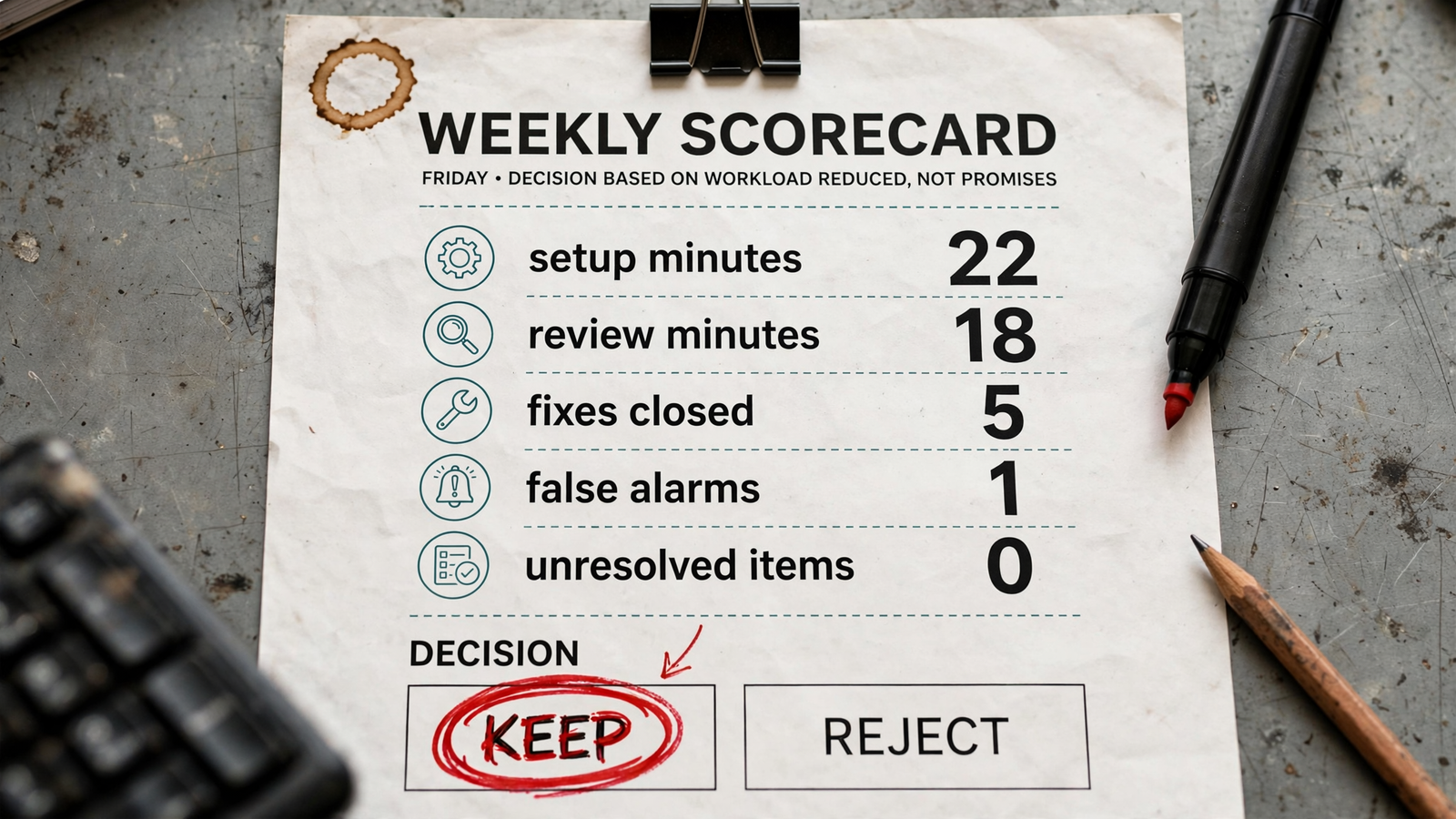
Don’t claim five days proves a CPA improvement. Say you’re spending $20k a month across ten accounts with mixed lag windows. A keyword you pause can look like a tidy win on Friday and a mistake on Tuesday when delayed conversions land. That doesn’t make the test useless. It means the test measures the work you did and the problems you caught, not the profit you think you made.
Cost: a tally against the old routine, including the minutes spent fixing the queue itself. Buys: a keep-or-cut decision on workload. Leave autopilot off. Passing a five-day test doesn’t give anything permission to run overnight.
7. When the constraint lifts: widen the assignment one way at a time
If groas leaves fewer problems unattended without adding review time, add three accounts before you allow a new action type. Keep the batch size at two and the same six fields: account ID, observed change, supporting figures, data limitations, urgency and next decision. Keep the prohibitions in place until the log shows ten clean approvals in a row. Change the account count before you change the permissions. If the queue gets harder to review, I want to know what changed.
Cost: one more week of the same discipline. Buys: a check on whether the setup holds beyond the first ten accounts, before you hand over more authority.
Autopilot gets its own written ruleset and its own approval. Mine would name the allowed actions, like pausing a losing keyword or shifting budget inside a capped campaign. It would also say what’s off-limits: no budget increases, no new campaigns, no bid strategy changes without named approval and no changes inside the conversion lag window recorded on Tuesday. Every change stays logged with its reason and reversible in one step. I read that log the same morning I used to export CSVs. I used to leave auto-apply on because Google called it a recommendation. I was wrong. A change without my name on it is still my CPA when the client asks.
I don’t buy a tool because it says it handles strategy. The judgement is in deciding which problems deserve attention and which changes deserve approval, with numbers attached. If groas takes work off my desk while I keep that call, I give it more accounts. I give it nights and weekends only when the log earns that too.





