

 LinkedIn

Opteo announced Microsoft Advertising support, an Agent that can make account changes, and an MCP beta for ChatGPT. It did not say that every Microsoft Ads change you can make in Opteo can also be made through ChatGPT. I chose Opteo’s November 10, 2026 changelog because it’s the vendor’s own launch announcement, not a demo or a reseller summary. I can grade what it says without pretending I tested a beta I didn’t test.
I managed Bing accounts by hand long enough to recognize the failure mode. A tool says it supports Microsoft Advertising. A buyer hears negatives, budget edits, and bid changes through the assistant they already use. Then they connect the account and discover they can pull a report. That’s useful right up until they need to do something about the report.
I’ll use three labels as I go: explicitly documented for what the passage says, inferred for a reasonable reading it stops short of stating, and not established for what I wouldn’t buy on the strength of that passage. The buying question is whether ChatGPT can read your Bing account, propose a fix, and make that exact change. The announcement gives those questions different answers.
Microsoft Advertising is on the list. The tools aren’t.
The platform passage says Opteo works across Google, Microsoft, Meta, LinkedIn, and TikTok Ads, with deeper support filtering through every day. Explicitly documented: Microsoft is a supported platform. Inferred: the breadth of that support was still changing at launch. Not established: which Microsoft operations, if any, the MCP beta exposed to ChatGPT. I wouldn’t start filling in that last column from a platform name.
Here’s how I split the scope when I’m reading a claim like this:
- Reads: Can I pull a performance report, download campaigns, or check change history?
- Recommendations: Can the assistant use what it retrieved to propose a specific correction in plain English?
- Writes: Can the assistant actually change the campaign, ad group, keyword, negative, budget, or bid I asked it to change?
A connector can clear the first two and still leave me pasting negatives into Microsoft Advertising by hand. That’s the distinction I take from Microsoft’s own Advertising MCP use cases. Microsoft lists reporting, campaign insights, entity lookup, assets, anomaly detection, change history, and cross-platform comparison. Those are read scenarios. There’s no write scenario on that list. That’s Microsoft’s connector, not Opteo’s, so it doesn’t settle what Opteo can do. It does show why I don’t treat access to an account as permission or ability to edit it.
My verdict: Microsoft support is documented; ChatGPT writes are not. If I’m buying the connector to add negatives or change bids, I want those operations named. The platform list doesn’t name them.
The Agent shows the change before it makes it
The Agent passage is the strongest part of the announcement. It describes live data retrieval, account context that’s already loaded, and the ability to push changes to the account. Before a change goes through, the Agent shows a preview I can edit, approve, or cancel. That’s enough detail to picture the workflow: it reads the account, shows the proposed edit, and leaves the decision with me.
The preview is the bit I care about. I don’t want to find out from a tidy summary that the Agent interpreted my request differently than I did. I want to see the change while I can still say no. Opteo documents that step inside its own product, where its Agent has the account context and shows the preview. The passage doesn’t say I get the same context or the same approval step when I talk to an external assistant.
That’s where the wording can get away from a buyer. The Agent passage answers what happens when I use the Agent in Opteo. It doesn’t give me the MCP tool list, and it doesn’t show me what a proposed Microsoft change looks like in ChatGPT. The fact that the same vendor offers both isn’t enough to carry the workflow from one interface to the other.
My verdict: I’d keep the Agent preview. I wouldn’t count it as a connector feature. If I need to review edits in ChatGPT before they go live, that’s the workflow I need to see documented.
The MCP beta names the assistants, not the Microsoft actions
The beta passage says I can connect Opteo to a personal assistant such as Claude, ChatGPT, or Cursor, and that I should contact the customer team for early access. Explicitly documented: the beta exists, those assistants are intended clients, and I have to ask for access. Not established: which Microsoft tools I’ll get, what happens before a write runs, or whether I can undo it in one step. Access to the beta isn’t proof of feature parity with the Agent.
Later Opteo documentation makes the difference concrete. It describes Microsoft MCP reads and changes, including campaign downloads and bulk-upload changes checked against the live account. The MCP overview also says changes go live as soon as they run, there’s no undo button, and Opteo doesn’t add an approval step of its own. It advises leaving approvals switched on in the AI tool. That’s a different setup from the preview and approval flow described for the in-product Agent.
The connector gets something the Agent doesn’t, too. Later documentation says MCP can read and change any linked ad account in one conversation, while the in-product Agent changes only the account its conversation belongs to. If I’m working across accounts, that broader reach matters. It still doesn’t give me the Agent’s preview, and none of those later details were established by the November 10 beta passage.
My verdict: the launch tells me how to ask for access, not what I’ll be able to execute. I’d check the tools available for Microsoft Advertising specifically, then look for the one operation I need. If I need to add a negative and the connector can only draft one, it hasn’t done the job. It’s written me a to-do list.
The acceptance request I’d use before approving a write
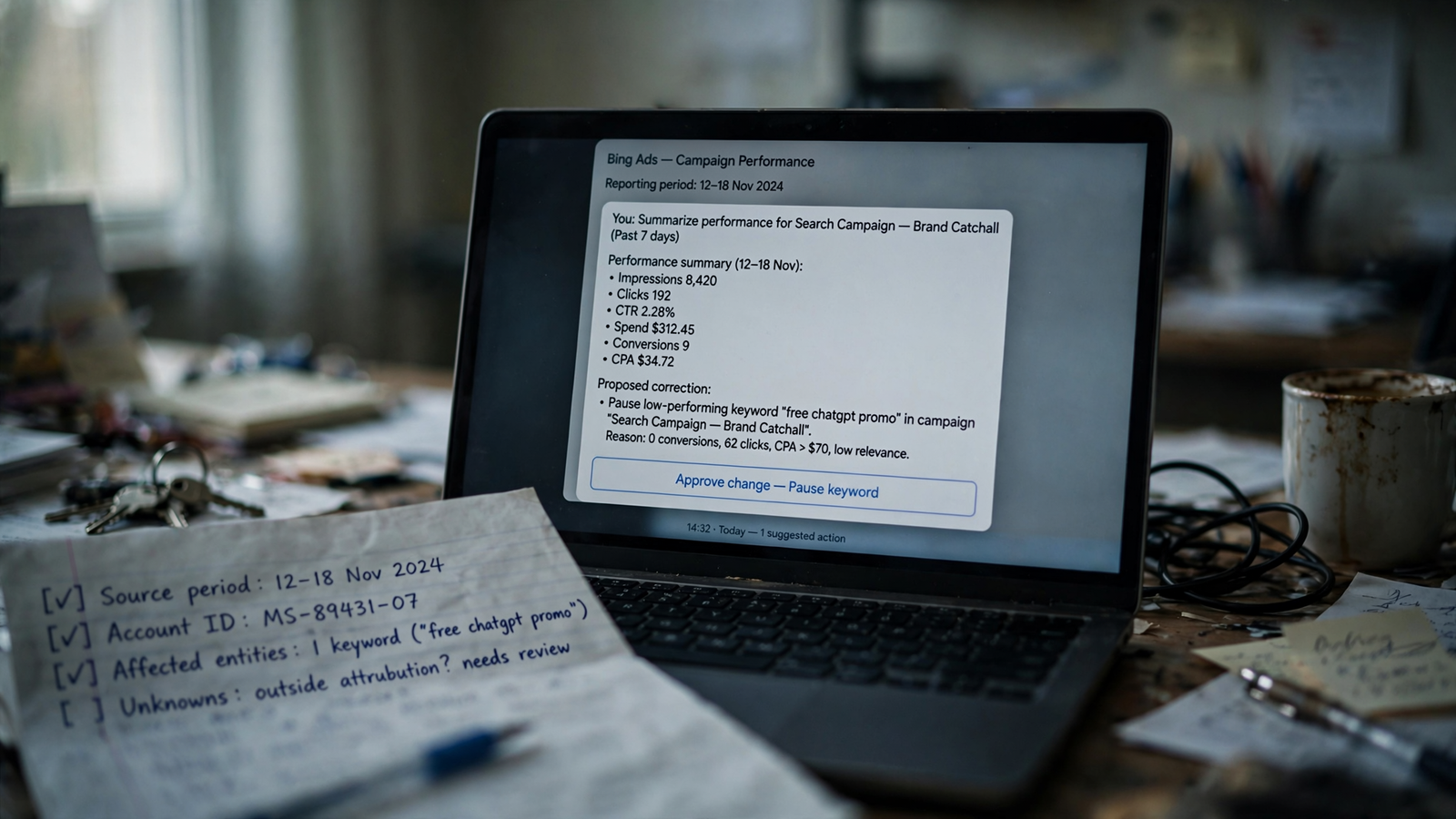
I’d start with one Bing campaign and a date range I chose. I’d ask ChatGPT to identify the connected account and pull the campaign data for that period, then give it a narrow request:
Read this Bing campaign, identify the largest spend changes and draft one proposed correction. Make no changes.
I’d check the answer against four requirements:
- Account ID and source period. A campaign name I recognize is not enough. I want the account ID and the dates behind the report, so I can check that it’s looking at the account and period I asked for.
- Affected entities and numbers. I want the campaign and, where the correction calls for it, the ad group, keyword, or negative. Show me the spend change behind the proposal, not just a recommendation that sounds reasonable.
- An explicit list of unknowns. Tell me what the connector couldn’t retrieve, what dates it guessed, and what metrics it inferred. I’d rather see a gap than have it filled in with a plausible number.
- No changes. The request is to draft a correction. I should get a proposal, not an edited account.
If I can’t verify the account and period, I don’t count the response as a successful live read. If I can verify them and the numbers check out, I’ve tested a read and a recommendation. I still haven’t tested a write. That’s the distinction a polished demo can skip without ever saying anything technically wrong.
Only then would I approve one narrowly scoped write, and only if I’ve confirmed that the connector supports it. One negative, one budget edit, or one bid adjustment. I want to see what’s there now, what will be different, and how I’ll reverse it before I say yes. If I can’t see those three things, I’m not handing over the edit. I can still use the report.
Where groas gives me a clearer buying decision
If I need live Bing analysis and requested changes through ChatGPT, groas documents that route directly: connect Microsoft Advertising, add groas to ChatGPT over MCP, then ask for the report or campaign change. The setup is described as taking about a minute to add groas to ChatGPT, with no code. The important part to me isn’t the minute. It’s that the documentation names ChatGPT as the interface for requesting the work and says every change is logged with its reason and can be undone in one step.
That’s the stronger fit for the workflow I’m buying. Opteo’s launch puts an approval preview inside its own Agent, and its later MCP documentation tells me to rely on approvals in the AI tool and not to expect an undo button. groas gives me a documented route for the work I want to request in ChatGPT and a way back after a change. I’d still run the same acceptance request. I want the account ID, the source period, and a correction I can inspect before I trust either connector with an edit.
The price comparison is concrete, too. groas Unlimited is $19 a month, flat, for the whole team, with unlimited teammates, ad accounts, and websites, plus every feature and all the data. Opteo starts at $129 a month for 10 accounts and $25,000 in monthly spend, with higher tiers at $249 and $499. MCP is included in every Opteo plan, though some AI-side tools draw on an Agent token allowance. I prefer paying the lower flat price for the route I actually need, with the reversal path spelled out.
Neither the price nor the change log tells me whether my proposed edit is a good idea. I still need a connected account and a correction that holds up against the numbers. If I’m budgeting for more than the connector, I’d also read what ChatGPT approval rights actually cost before signing anything.
Verdict: Keep the preview. Don’t buy the implied workflow.
Opteo’s November 10 announcement documents three things: Microsoft support that was still deepening, an in-product Agent that retrieves live data and previews changes, and an MCP beta I can request through the customer team. It doesn’t document that every Microsoft action works through ChatGPT, that the Agent’s preview travels with the connector, or that the beta covers the particular Bing edit I need. Later documentation answers some of those questions. It doesn’t change what the launch announcement established.
What I’d keep from Opteo is the Agent’s preview: live data in, proposed change on screen, operator decides before anything reaches the account. What I wouldn’t buy is the inference that Microsoft plus Agent plus MCP on one page equals a working ChatGPT execution path for Bing. I’d run the read-only request, check the account ID, source period, affected entities, and unknowns, then confirm the exact write before approving it. The vendor that clears that bar on documented terms is the one I’d pay.





