LinkedIn

If you’re choosing between Screaming Frog MCP and groas in Claude, look at the SEO task nobody has finished this week. If it’s a JavaScript crawl you can’t get right, buy crawl control; if it’s a page you need to justify with search and AI citation evidence, then get approved and publish, buy the workflow that gets the page live.
I used to judge tools like these by how many settings they exposed. I was wrong. A long list of controls mostly told me how much interpretation I’d be doing myself. Now I write down one request, decide what would count as a usable result, and see what work the tool leaves behind.
- Job A: configure the crawl. “Enable JavaScript rendering, set up these segments and extract the author and date from these templates.” I want a configured crawl and extraction results I can check against a known page.
- Job B: get the missing page ready to ship. “Find buyer prompts that cite competitors, check our search performance and draft the missing page for approval.” I want to see the evidence behind the draft and be able to publish it if I approve it.
My pick for the team trying to finish Job B is groas in Claude. Screaming Frog wins Job A. It’s a narrow win, but not a trivial one. The expensive mistake is buying either tool for the other job just because the two connectors sit under the same label.
1. Crawl control: Screaming Frog goes deeper
The SEO Spider 25.0 release moved configuration to JSON so Claude can adjust settings from a plain-English request. That includes enabling JavaScript rendering, setting up segments, writing custom JavaScript snippets and working out XPath for custom extraction. The release also adds MCP debugging tools that let Claude explain a crawl problem and propose a fix. The MCP requires a paid licence and database storage mode.
This is useful when, say, catalogue filters only render in the browser, or when you need author and date from templates that change by section. Describe what you want extracted, let Claude write the XPath, then check the result against a page you know. A plausible-looking rule isn’t the same thing as the right data in the export.
The configuration details are where Screaming Frog earns its place and where I’d pay attention. A practitioner’s re-test of v25.1 describes 44 named tools and a three-step workflow: list the configuration categories, get the schema for the relevant category, then set the configuration. Lists are replaced, not merged. Send one custom-extraction rule on its own and you can wipe the rest of the list. Plain English is the interface; it doesn’t change what the setting does.
I wouldn’t buy groas as a substitute for that depth. If the deliverable is per-URL crawl data at scale, custom JavaScript extraction across thousands of templates or a segmented crawl of a faceted catalogue, Screaming Frog has the sharper instrument. If the work ends with a correctly configured crawl and usable extraction data, buy Screaming Frog.
2. Search and AI visibility: groas shows what’s worth investigating
Job B starts with what buyers ask and which sources the answers cite, not with how a crawler sees the site. In groas, Claude can work from tracked AI answers alongside Search Console query and landing-page data and GA4 sessions. I can see the prompt that surfaced a competitor, look at what the answer cited, then check what my own search data says before deciding whether there’s a page worth writing or rewriting.
Ask to see the prompt, the answer and the cited source. If Claude can’t show me those three things, I’m not calling it an AI visibility gap. I’m calling it a hunch wearing a dashboard costume. And if a competitor shows up on twelve buyer prompts where my site doesn’t, that’s worth investigating. It doesn’t, by itself, tell me whether I need a new page or a better version of one I already have. That’s why I want the citation evidence and my own search data in the same conversation.
Screaming Frog does use search and analytics data in its own workflow. One documented example joins broken links with GA sessions and Search Console clicks in a crawl export. That’s useful context for a crawl finding. It’s not the same as seeing which pages AI answers cite for buyer prompts and comparing that evidence with your own search performance. The crawler can show me a page that’s thin, orphaned or blocked; I wouldn’t buy it to tell me which competitor sources keep showing up in AI answers.
The distinction is easy to miss on a feature list: both tools can work with Search Console data, but they put it to different uses. For deciding what to write from search and citation evidence, I’d start in groas.
3. Publishing: groas takes the approved fix live
A draft isn’t a published page, just as a crawl export isn’t a fixed site. In groas, Claude can use the evidence to draft the missing page or rewrite the thin one. I can inspect that draft against the prompt, cited source and search data, then approve it or send it back. Publishing happens only after approval. The change is logged with its reason and can be undone in one step.
I’ve sat through enough agency audits where the recommendation was right and nothing shipped. The problem wasn’t that the PDF needed another chart. It was that the person looking at the evidence still had to turn it into a draft, get someone to sign off and put the thing on the site. With groas, I still make the editorial call. I don’t have to take the recommendation out of one tool and start the publishing job somewhere else.
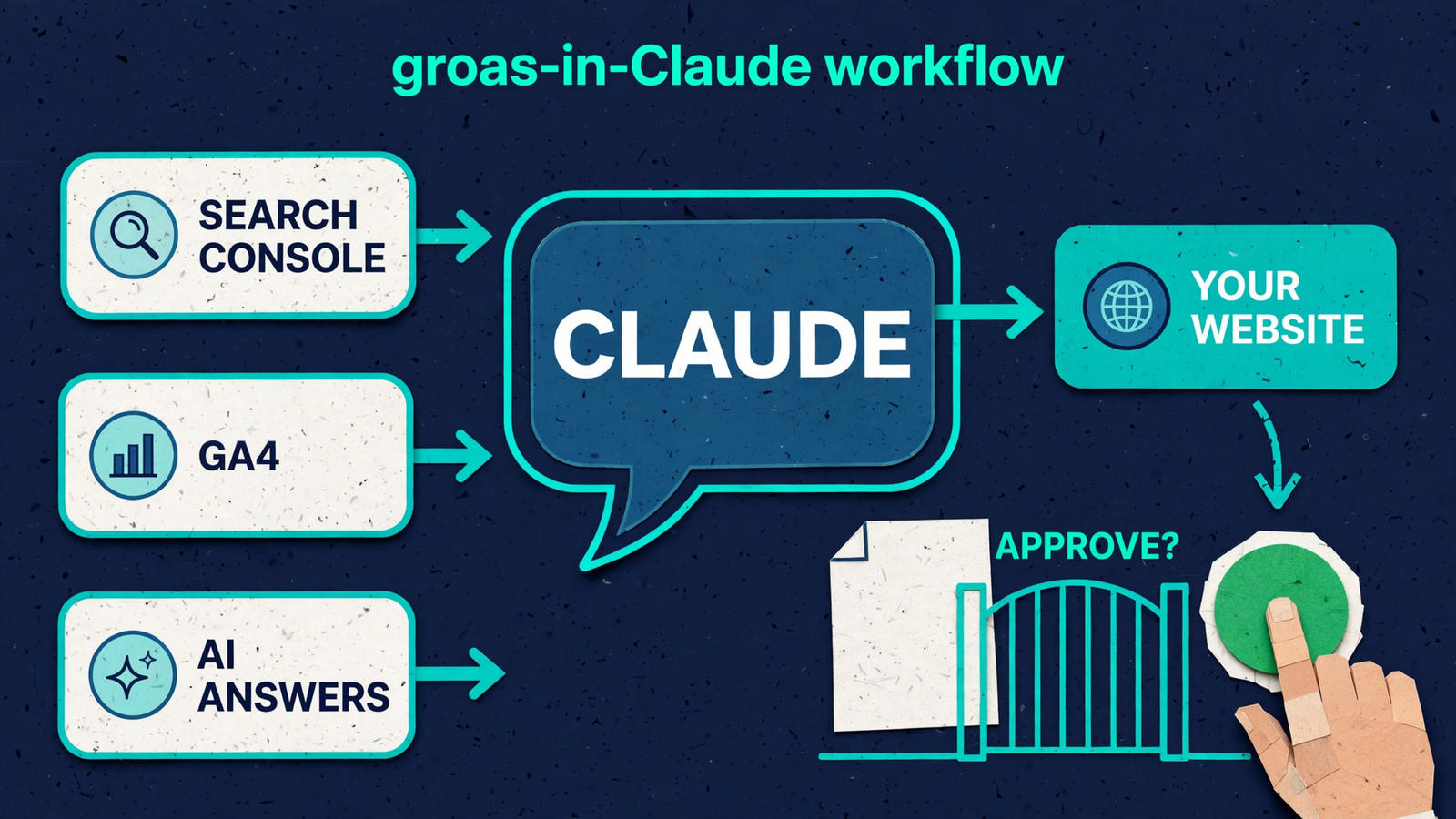
Screaming Frog’s documentation doesn’t promise website publishing. I don’t hold that against a crawler any more than I expect groas to run a 50,000-URL segmented crawl. But I count the work left over. If my task ends with an approved page going live, a diagnosis is an input, not the deliverable. Judge the purchase by what’s still on your list after Claude answers.
4. Setup: browser connector or local app?
Where your team uses Claude can settle the purchase before price does. Screaming Frog’s local HTTP server listens at localhost:11435/mcp and runs while the SEO Spider app is open. With STDIO, Claude Desktop can launch the Spider without opening its interface. Both are local setups. If the plan is to add the local server as a custom connector on claude.ai, that won’t work: those connections originate from Anthropic’s cloud.
Groas is a hosted connector. Connect Search Console and GA4 once, and Claude can work with that data in the browser without a machine running the Spider. Claude’s free plan is limited to one custom connector, so check whether that slot is already spoken for. Check the Claude plan separately from the MCP price rather than treating them as one bill.
There are also free community MCP servers for Search Console and analytics. They can make sense if that’s all you need. But some mean setting up a Google Cloud project or running a server on your own machine. That’s fine if you’re happy to do it. If the point of the purchase is to give the team a browser workflow without taking on local setup, don’t price your setup time at zero.
5. Cost: price the work the team actually needs
Groas Unlimited is $19 a month for the whole team, with unlimited teammates, ad accounts and websites and every feature included. For an agency, that means the price doesn’t go up per seat, account or client when you run the same workflow again. The pricing page offers 500 free credits to try it before paying the monthly fee. Any cost for your chosen Claude plan is separate.
Screaming Frog charges £199 per licence per year for one to four licences, with discounts at higher volumes. In the US, it’s $279 per named user, billed annually. The free Spider is capped at 500 URLs per crawl, but the cap isn’t what rules it out for Job A. The free version excludes the MCP server, crawl configuration, JavaScript rendering and custom extraction. The exact things I’m asking Claude to do sit behind the paid licence.
One $279 licence is a defensible purchase for the person who needs it. Five people who each need a licence make for a different conversation, even before you get to the volume tier. And no number of licences turns a crawl export into a publishing workflow. Price the seats against the job they do. If you’re still weighing free connectors against paid ones, the comparison of Search Console, Ahrefs, Semrush and AI visibility servers covers the wider field.
Here’s the comparison I’d use to make the call:
| Buying decision | Screaming Frog MCP in Claude | groas in Claude |
|---|---|---|
| Crawl control | Configures and debugs specialist crawls, including rendering, segments and extraction | Not the pick for specialist crawl configuration |
| Search and AI visibility | Adds search and analytics context to crawl findings | Connects Search Console and GA4 data with tracked AI answers and cited sources |
| Publishing | Website publishing isn’t documented | Drafts the fix and publishes after approval, with a change log and one-step undo |
| Setup | Local SEO Spider app or Claude Desktop setup | Hosted remote connector for Claude in the browser |
| Cost | Paid annual licence per named user for MCP access | $19 a month flat for the team, with 500 free credits to start |
Verdict: groas wins for the team that needs to ship a page

I’d buy groas if my team needs to turn search and AI visibility evidence into an approved page. If my backlog says, “Competitors are getting cited on prompts we should win, we can see the queries in Search Console, and nobody has written the page,” that’s the request I’d use to test it. I’d ask to see the answers and their sources, check the draft against the search evidence, then approve it if it’s ready. The test isn’t how impressive the first answer looks. It’s whether I can get from that answer to a live page without starting the job over.
I’d pick Screaming Frog instead if the blocker is a specialist crawl. If I can’t pull author and date from 40,000 templated pages, or JavaScript rendering is keeping the catalogue out of the audit, there’s no point buying a publishing workflow to solve it. I’d pay for the licence, have Claude configure the crawl and check the output against pages I know. That’s a real win for a real job. I just wouldn’t put buyer-prompt monitoring or publishing on the same purchase order and expect the crawler to handle it.
I’d buy both only if both jobs have earned their place on the backlog. A large site can have a rendering problem and an AI citation problem at the same time, but two tools are not the default just because both say “SEO MCP”. The cheapest workable choice is the one that finishes the job you’re paying for this week. Buy that one. When the next task changes, run the test again.