

 LinkedIn

I give Claude 45 minutes and two accounts, one Google Ads and one Microsoft Advertising, with no campaign, budget, or bid changes. If the accounts disagree on what counts as a conversion, a combined report just gives the disagreement a total. I want one paid-search brief I can defend and a short list of what I still can’t explain.
Google and Microsoft use different tags, counting rules, and attribution defaults. Add their conversions together and you can count the same customer twice while producing a number that looks precise. Microsoft’s discrepancy checklist starts with goal criteria, tag pages, conversion windows, counting, and time zones. I start there too. Connecting Claude through groas gives it access to both accounts. It doesn’t make their conversion definitions agree.
I cut campaign imports, budget moves, bid changes, and autopilot. If one platform has a looser conversion definition, moving money toward the lower reported CPA can reward the definition rather than the performance. I cut the dashboard build for the same reason: a better-looking total is still the wrong deliverable. Four steps fit inside the 45 minutes. The fifth is for the next run. If the clock runs out before I can defend the comparison, I stop. The unresolved-issues list is part of the brief, not an apology for it.
1. Lock the accounts and date range (minutes 0–10)
Cost: 10 minutes. Buys: a comparison scoped to the right accounts and the same complete period. I put the actual account IDs and dates in the prompt. A familiar account name isn’t a substitute for an ID.
Read only these Google Ads and Microsoft Advertising account IDs. Use the same complete date range for both. Report the currency, time zone, and conversion goals for each account, and flag any unavailable fields. Do not change campaigns, budgets, or bids. If either account ID does not resolve, stop and say which one.
Microsoft documents side-by-side account comparison as an MCP use case, with both platforms connected and both accounts named. It covers account structure, settings, performance, and keywords. Here I want the scope confirmed before I ask Claude to interpret performance. I check the IDs and dates it returns against what I put in the prompt. I want to see what it actually pulled, not just what I asked for.
If the 30-day pull is slow, I don’t quietly switch to the last seven days. If the accounts use different time zones, I want both named; identical start and end dates don’t make that difference disappear. And if Claude can’t confirm the accounts or the period, I stop here. A quick pull on the wrong account is worse than no pull. It looks like progress, and someone might use it.
2. Reconcile the conversion definitions and build two tables (minutes 10–25)
Cost: 15 minutes. Buys: a comparison of the same event, plus a record of everything that doesn’t match. These are the 15 minutes I protect. I’d rather finish with fewer Bing flags than spend the rest of the session explaining a CPA gap I haven’t earned the right to interpret.
List every conversion action or goal included in reporting for each account. For each, show whether it is primary and whether it is included in bidding, where those settings apply. Show the counting setting, attribution model, conversion window, and tag or import source. Separate qualified leads from other recorded actions where the data supports it. Flag anything you cannot see.
I want the settings before the performance numbers. On Google, a primary action can appear in Conversions and feed bidding when its goal is used for optimization. Secondary actions generally don’t feed bidding, but a custom goal is an exception. Google’s conversion-goals documentation explains the distinction. Then there’s counting: Every and One can give different counts for the same action. Google’s counting help is worth having open before I compare the counts. Two rows can both say “lead” and still count different things. If I can verify a qualified lead on one side but only a recorded lead on the other, the shared label doesn’t earn that pair a row.
Attribution is a separate problem. As this breakdown of the platforms’ attribution defaults explains, a customer can click Google first and Bing second and be credited by both. That’s how summed platform revenue can exceed the revenue I actually received. Matching the event definition doesn’t make the platforms agree on who gets credit, and it doesn’t turn their counts into unique customers.
Put the comparison and the exceptions side by side
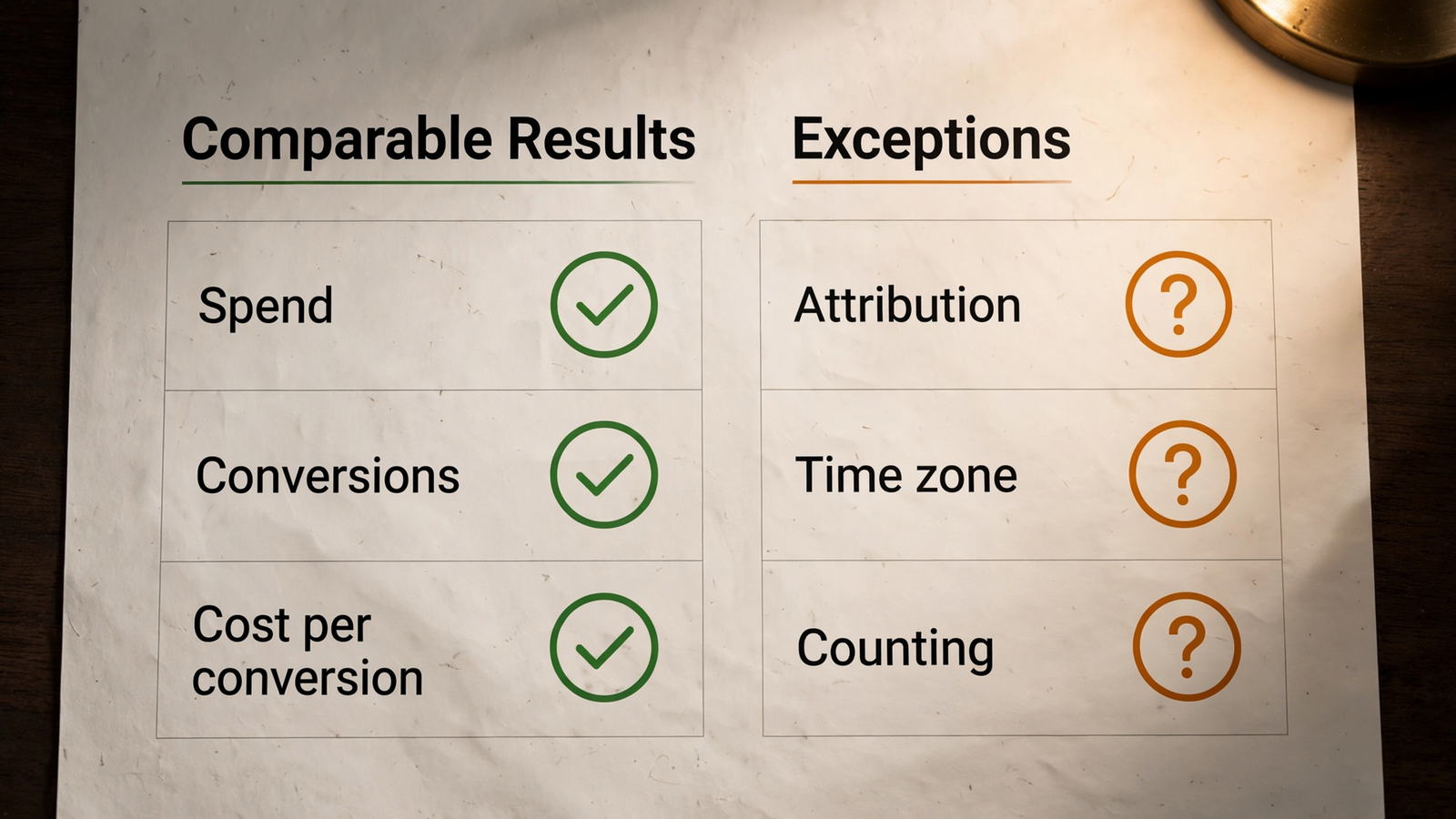
I ask Claude for exactly two tables in the reporting brief, with no blended conversion total:
- Comparable results. Show Google and Microsoft side by side for the same complete date range, with the currency treatment stated explicitly. Include spend, comparable conversions, and cost per comparable conversion. Include only actions that match on definition and counting, and don’t use a pair if an unresolved setting makes the comparison indefensible. Label the counts comparable conversions, not unique customers or total leads.
- Exceptions. Record each difference that couldn’t be reconciled and why it matters. That includes mismatched windows or time zones, unavailable fields, and actions that exist on only one platform. Microsoft’s checklist also names duplicate UET tags, cross-device differences, and attribution changes as possible causes of gaps. If Claude can’t verify one of those, I want it listed as something to check, not presented as the explanation.
The distinction matters when the first table is sparse. I don’t borrow an action from the second table to fill a hole in the first. And I don’t treat a missing setting as if it matches just because the goal names do. If I can’t verify any comparable actions, I leave the conversion and CPA cells blank and explain why in exceptions. Blank means I couldn’t make the comparison. Zero would tell a different story. If a number can’t go in the comparable table, the reason goes in the exceptions table. No third place.
3. Flag what needs attention on Bing (minutes 25–35)
Cost: 10 minutes. Buys: a short review list, not a change list. I stay inside the same date range and the conversion set I just reconciled. I’m not spending these ten minutes chasing a bad Tuesday.
This Google and Microsoft reporting comparison points out why lower Microsoft volume can make daily figures jump around. I read the weekly or monthly rollup rather than treating an isolated daily split as a verdict. If the evidence is thin across the full range, the flag needs to say so.
Within the comparable data only, flag Microsoft Advertising campaigns and search terms that need review. For each flag, give the evidence, the uncertainty, and the proposed next check. Draft any change as text only. Do not apply anything.
I want three parts per flag:
- Evidence: Name the campaign or search term and give its spend and comparable conversions within the agreed range.
- Uncertainty: Say what could make the signal misleading. Low volume, almost no recent clicks, or doubt about which goal got counted are reasons to be careful, not details to bury.
- Next check: Name the thing I’d verify before touching the account. If goal inclusion is in doubt, for example, check whether the conversions came from an action outside the comparable set.
A flag without an uncertainty statement is an opinion wearing a costume. Cut it. If the comparable table doesn’t support a flag, I don’t reach into the exceptions table for a stronger-looking number. And if the next check shows that the flag depended on an unreconciled goal, I drop the performance flag and keep the measurement issue. The exception is already a finding. It just isn’t a performance finding.
4. Give every unresolved issue an owner (minutes 35–45)
Cost: 10 minutes. Buys: a register the team can use after the chat ends. I ask Claude for a copyable register with six columns: account, issue, evidence, owner, next action, and status. Every row comes from the exceptions table or the Bing flags. I keep each cell to one line. If the issue takes a paragraph to explain, I haven’t made the next action clear enough. “Check tracking” is too broad. “Confirm whether the Bing goal counts the same lead action as Google” gives the owner something to come back with.
I paste the register into the shared document the team already uses. That’s where I put a name against each next action. I don’t present it as task management built into the connector. In a Reddit discussion about managing multiple client ad accounts, the original poster asks where ownership, issue status, and team visibility live after the AI answers. A commenter describes metrics, tasks, and issues scattered across systems that are supposed to make up one workflow. That’s the gap I’m closing with the shared register, not with another dashboard.
The comparable table says what I can defend. The exceptions table says what I can’t reconcile. The register says who checks what next. I start every row as open. Finding a problem is not fixing one, and nothing in this session earns a closed status. At minute 45, I stop. Any gap I haven’t resolved stays visible instead of becoming a footnote to a recommendation.
5. Save the prompt for the next run, not the assumptions
Cost against the first session: no extra minutes. Buys: a repeatable comparison instead of a one-off favor from Claude. For the next run, I keep the exact prompt, with the account IDs filled in, in the same shared document as the register. I change the date range and start again with the account scope. Then I check the conversion settings, rebuild the two tables, review the Bing flags, and update the register in that order.
Reuse the prompt. Never reuse last month’s conclusion. Someone adds a goal, swaps a tag, or edits a landing page, and CPA moves while the dashboard keeps smiling. I’ve watched it happen. The prompt saves me from writing the instructions again. It doesn’t save me from checking whether the instructions still produce a fair comparison. If a setting has changed or a field is missing, it goes back into exceptions. I don’t carry a match forward just because it held last time.

When the constraint lifts, work the register first
The end of the 45 minutes is not permission to change a campaign. Once I’m ready to move beyond the read-only brief, I work the register first: resolve the measurement differences, then rerun the brief to see whether the comparable table holds up. Only then do I review a separate change list. Each proposed change still needs evidence, a statement of uncertainty, and explicit approval. Autopilot stays off until I deliberately switch it on.
This is where groas earns its place in my stack. One MCP connection gives Claude both accounts to read. groas Unlimited is $19 a month flat for the whole team, with unlimited accounts and websites. When I do move from review to execution, each change groas makes is logged with its reason and can be undone in one step. That’s what I’d pay for over a per-seat or per-account reporting tool that pulls the numbers together and leaves me to reconcile them anyway. A dashboard that collects the numbers but leaves the comparison untouched is the most expensive kind of cheap.
My test is whether I can hand someone the comparable table, the exceptions table, and the register and have them tell me what I know, what I don’t know, and who owns each unknown. If they can’t, another connector won’t fix it. Connect Claude, run the brief, resolve what the register names, and only then let anything touch the campaigns.





