LinkedIn

Your head of growth wants proof that ChatGPT recommends your business. A Search Console screenshot won’t do it, and a link to your website in a ChatGPT answer isn’t proof either. If you’re the person who has to answer that question before the next meeting, here’s the head-to-head: Google Search Console vs. groas AI answer tracking in Claude.
I’d start with groas for this job. It captures the answers so you can read what ChatGPT actually said. Search Console’s Generative AI performance report counts impressions of your links in Google’s own AI features. Useful data, wrong question. If you want to know which Google queries show your pages and which pages get clicks, I’d open Search Console first.
The distinction that matters is in the wording. An answer can name you without recommending you, cite a page without naming your business, or recommend you without linking anywhere. Roll those three events into a visibility score and you get a tidy number that can’t answer the question your head of growth asked.
| What you need to know | Google Search Console | groas AI answer tracking in Claude |
|---|---|---|
| What did Google show, and what got clicked? | Standard Performance reports queries, impressions, and clicks; the Generative AI report shows link impressions | Not its job |
| What did ChatGPT actually say? | Doesn’t track ChatGPT | Captured answers with the assistant and capture date |
| Was it a mention, a citation, or a recommendation? | Google AI link impressions don’t show the wording | Read the answer and check the cited URLs |
| Who appeared alongside us, and how were they described? | No view of brands in the same answer | Compare the wording and order within each captured answer |
| What should we change? | Find queries and pages worth investigating | Use the answer text to draft a specific change for review |
1. Google visibility: Count the impressions, not the recommendations
Search Console is where I start when a page loses Google traffic. The standard Performance report lets me look at the queries the page showed up for and what got clicked. The Generative AI report is narrower: it counts link impressions, not clicks. No queries, no click-through rate, no position. You can break those impressions down by page, country, device, and date. You can’t use them to tell whether an AI Overview caused a drop in clicks.
There are two accounting traps here. As Crawlito notes, the AI impressions are already counted under the Web search type in the standard Performance report. Add the two together and you count those impressions twice. And sites below the volume threshold don’t get the AI report at all. An absent report is not proof that Google’s AI features never show your site.
None of that makes Search Console a bad tool. It makes it a good tool with a clear boundary. It measures Google’s own surfaces and doesn’t track ChatGPT. Use it to investigate what Google showed. Don’t ask an impression to tell you what an assistant said.
2. Answer records: Read what ChatGPT said, not what a score implies
groas starts with the answer rather than a signal it leaves behind. It captures AI answers, and Claude can query those records through the groas MCP connection. Claude is where I ask for the evidence; ChatGPT is the assistant whose captured answer I’m reading. That distinction matters. I’m not asking one assistant to guess what another would say.
A transcript gives me something I can check: the buyer prompt, the captured answer, and the date it was captured. If Claude calls an answer a recommendation, I can read the sentence and decide whether it supports that label. A score of 62 doesn’t give me a sentence to disagree with.
That’s the problem practitioners on r/DigitalMarketing ran into when tools returned different visibility scores for the same brand. The tools sampled different prompts, locations, and model versions, and didn’t all count the same thing as a hit. A tool builder in the thread reported that only 54.8% of 431 ChatGPT API answers carried any citation. In that sample, counting links meant leaving a lot of answers unread. Before debating the score, ask to see the answer.
3. Recommendation or mention: Make the wording do the work
I use Astiva’s distinction between mentions, citations, and recommendations. It keeps a flattering sentence from doing more work than it should:
- A mention names the brand. “Brand A is well known” is a statement about reputation, not advice to buy it.
- A citation links to a page as a source. The page can support the answer without the answer ever naming the business.
- A recommendation presents the brand as a fit for a stated need. “Brand A fits your requirements” does that without a link. An explicit preference goes further and puts it ahead of the alternatives.
The rule I’d put at the top of the report: positive language isn’t enough; look for language that says the product fits the buyer’s need. A source link doesn’t do that on its own. Neither does a brand name in a list.
In one brand’s tracking across four engines, only 30 of the 381 answers naming the brand also cited its website. That’s about 7.9%. The figure doesn’t tell you how often the brand was recommended. It tells you how much of the picture you’d miss if the website link were the only thing you counted. Search Console can show that Google displayed a link. The captured answer lets you check whether the assistant made a case for choosing the business.
4. Competitor context: Find out who got the nod
Beket’s audit found that unbranded answers named 6.5 businesses on average in ChatGPT, 5.7 in AI Overviews, and 4.1 in Perplexity. Appearing alongside several competitors isn’t the same as being the one the assistant tells the buyer to consider. Compare what the answer says about each brand, not just where the names appear.
That’s where I want the whole response. Claude can list the brands in a captured answer, note their order, and pull out the wording that makes one sound like the default. Order is worth recording, but I wouldn’t award the win to whoever appears first without reading the paragraph. As one tracker’s panel illustrates, “consider this product” and “this product doesn’t support invoicing” both count as mentions in a simple tally. I wouldn’t put them in the same column in a client report.
Search Console has no record of who appeared beside you in the answer, let alone how the assistant described them. With the transcript, you can point to the exact passage where a competitor got the recommendation and you got a name-check. That passage is more useful than the fact that both names appeared.
5. Next move: Turn the evidence into one page change
Ask Claude for the transcript before asking for a verdict
Once groas is connected, paste this into Claude and replace the placeholder with buyer prompts you actually care about. Ask for the original wording and the capture date, not just the classification.
For these buyer prompts, show the captured answer, assistant, capture date, recommendation language and cited URLs. Separate recommendations from mentions and citations. Buyer prompts: [your list].
Read the quoted sentence against the full answer. Does it say you’re suited to the job, or does it just say you exist? If the recommendation depends on a particular requirement in the buyer prompt, keep that requirement with the quote. Otherwise a useful observation about one answer turns into a sales claim about every answer.
Mark missing observations as unknown
One practitioner on r/DoSEO ran 84 buying prompts twice in logged-out ChatGPT. Only about a quarter of the shops in the product cards appeared in both sets of answers. Across runs over three days, the shop in the top slot changed in 60% of US cases and 68% of German ones. That’s one practitioner’s sample, but it shows why I don’t treat a snapshot as a standing ranking.
Prompt choice can skew the read in the opposite direction. A branded prompt can flatter you because the assistant repeats the name you supplied. A set made up of broad category terms can leave a small brand with nothing to show. And an answer with no sources isn’t evidence that nobody got recommended. So I separate branded prompts from category and comparison prompts, attach the sample size to the rates, and use “not observed” rather than “not recommended” when the tracked set comes back empty. Claude can organize the observations. It can’t fill in ones nobody captured.
Give the finding a page and an owner
A score goes in a deck, the deck goes to the client, and nobody ships a page. I’d rather end up with one specific edit I can review. Here’s the order I’d use:
-
Find demand in Search Console. Start with queries where you already appear in Google but rank below the top three. Compare those queries with the buyer prompts you’re tracking. You’re looking for the language your audience already uses before you ask anyone to rewrite a page.
-
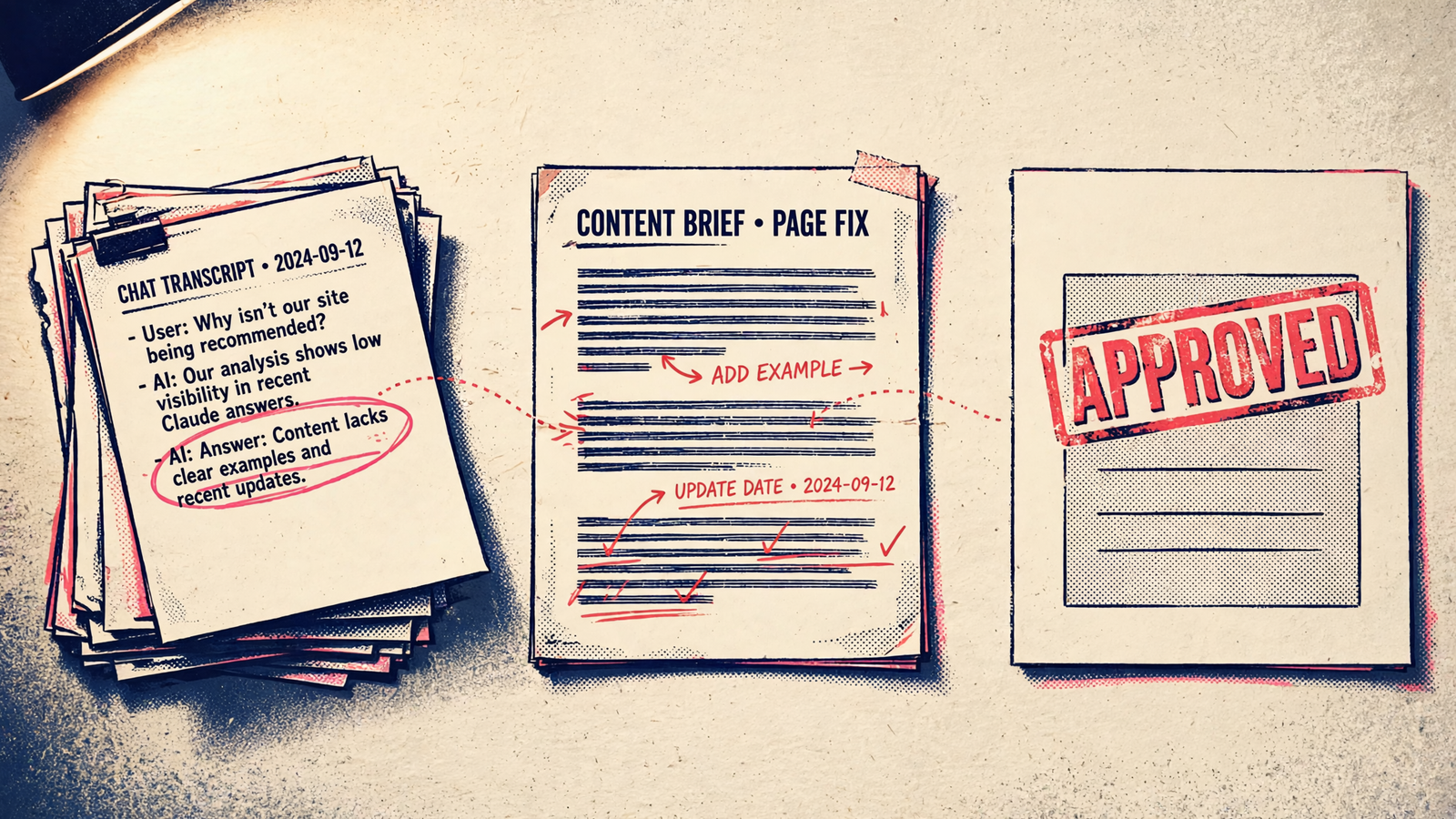
Use the captured answer to draft the brief. Give Claude the transcripts where a competitor got the recommendation and you got the mention. Ask which page to change, which passage to rewrite, and what claim the assistant made about the competitor that your page doesn’t address. One work order, not a 60-page audit.
-
Approve the copy before publishing. The transcript is evidence of what the assistant said, not evidence of what your product does. Check the draft against your own documentation and cut any claim you can’t support. groas logs changes with their reasons and lets you undo a change in one step. I still want to read the copy before it goes live.
A better page is something you can ship. A recommendation is something you can look for in the next set of captured answers. Don’t promise the second because you did the first.
The verdict: groas wins for ChatGPT recommendations
If your job is to show whether ChatGPT recommended your business, pick groas AI answer tracking in Claude. It gives you the captured wording you need to make that call. Search Console can’t see the answer. If someone hands you a Google link-impression report as proof that ChatGPT recommended you, they’ve measured a different thing on a different surface. The full workflow for checking what ChatGPT recommends is where I’d go next.
Pick Search Console first if your job is diagnosing Google Search performance: which queries show your pages, which pages get clicks, and how the numbers move by country or device. It’s free, it’s Google’s own data, and I wouldn’t buy a substitute to answer those questions. If the job ends with a page edit, use both: Search Console for the queries, groas for the answers, and Claude to bring the two into a brief you approve.
But for the question that started this piece, no amount of exporting from Search Console will put ChatGPT’s words in front of you. Connect groas to Claude, paste the prompt, and read the transcripts. Then run the three-pass check on whether ChatGPT recommends your business. If the evidence says “unknown,” put “unknown” in the report. A wrong answer you can’t audit is worse than no answer.